Quick disclosure: ToolCheckHQ may earn a commission if you buy through links on this page, at no extra cost to you. Here’s our affiliate disclosure.
A hailstorm rolls through on a Tuesday afternoon.
By Wednesday morning, a homeowner with a dented roof and a water stain on the bedroom ceiling has called 4 roofers. 3 of them went to voicemail. The 4th texted back in under a minute with a link to book an inspection.
Guess who gets the job.
GoHighLevel is software for being that 4th roofer, every time. It answers missed calls with a text, keeps every lead on one board, chases estimates you’d otherwise forget, and asks happy customers for a Google review.
For production work (measuring roofs, ordering shingles) you’ll want a separate tool. For getting from “phone rang” to “contract signed,” GoHighLevel is one of the better buys a roofing company can make.
Who it’s a good fit for
GoHighLevel makes sense for a roofing company that:
- gets leads from Google, Facebook, door knocking or storm canvassing
- misses calls when the crew is up on a roof
- sends estimates and then forgets to follow up
- has fewer Google reviews than the competitor down the road
And it’s probably overkill if you’re a one-truck outfit living on referrals with a 3-month waitlist. More on that further down.
Start a 14-day GoHighLevel trial
What it actually does for a roofer
| Roofing problem | The GoHighLevel fix |
|---|---|
| Missed calls in storm season | Missed-call text-back: an auto text goes out seconds after the call is missed |
| Leads coming from 5 places | One inbox for calls, texts, web forms, Facebook and Google messages |
| No idea which jobs are still open | A pipeline board with a column for every stage |
| Estimates that go quiet | Automatic texts and emails after an estimate goes out |
| Hardly any Google reviews | A review request sent when a job is marked complete |
| Old customers forgotten | Reminders for inspections, gutter cleaning and maintenance |
| Phone tag to book inspections | A calendar link homeowners book themselves |
How it fits next to JobNimbus or AccuLynx
Roofers ask this a lot, so let’s get it out of the way.
Production CRMs like JobNimbus and AccuLynx handle the build: measurements, materials, crews, job costing, photos from the site. GoHighLevel handles the sale: lead capture, texting, follow-up and reviews.
| GoHighLevel | JobNimbus / AccuLynx type tools | |
|---|---|---|
| Fast lead follow-up | Strong | Basic |
| SMS and call automation | Strong | Limited |
| Google review requests | Built in | Varies |
| Measurements and job costing | No | Yes |
| Crew scheduling and production | No | Yes |
A lot of roofing companies run both. GoHighLevel gets the homeowner to “signed,” then the job moves into the production tool.
If you only have budget for one and your problem is winning jobs, start with GoHighLevel. If your problem is running jobs, start with the production tool.
The pipeline
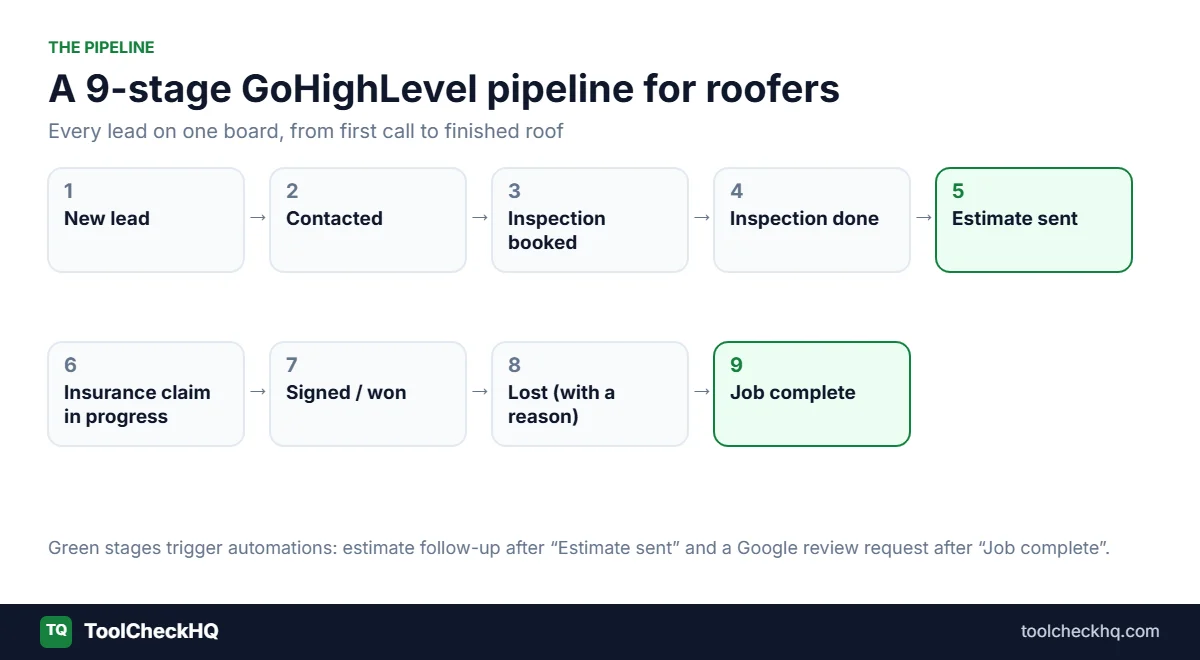
Make one pipeline called Roofing Jobs. Use these 9 stages:
- New lead (form, call, text or Facebook lead just came in)
- Contacted (someone actually spoke to the homeowner)
- Inspection booked
- Inspection done
- Estimate sent
- Insurance claim in progress (storm and restoration jobs only)
- Signed / won
- Lost (always pick a reason: price, timing, went with someone else)
- Job complete (this stage fires the review request)
Seeing every lead on one board is half the value, honestly.
On a Monday morning, the owner opens it and sees 14 homeowners sitting in “Estimate sent” who haven’t heard from anyone in a week. That’s money sitting on the table, and now it’s visible.
5 workflows every roofer should build
You build these in GoHighLevel’s Workflow Builder: pick a trigger and stack actions under it. For more examples you can copy, see our GoHighLevel automation examples.
1. Missed-call text-back

Trigger: an inbound call is missed.
Action: send this text straight away:
Hi, this is [Company] Roofing. Sorry we missed your call. Are you calling about storm damage, a leak, or a quote for a new roof? Reply here and we’ll get right back to you.
Build this one first. It takes about 10 minutes and it catches leads that would otherwise dial the next roofer on Google.
2. Speed-to-lead for new inquiries
Trigger: a form is submitted, or a Facebook or Google lead comes in.
Actions:
- Within 1 minute: text the homeowner a link to book an inspection
- At the same time: alert the sales rep by text and in the app
- No booking after 2 hours: send a second text
- Still nothing the next morning: create a call task for the rep
The system keeps nudging the homeowner and the rep until something happens. Your office manager stops being the company’s memory.
3. Estimate follow-up
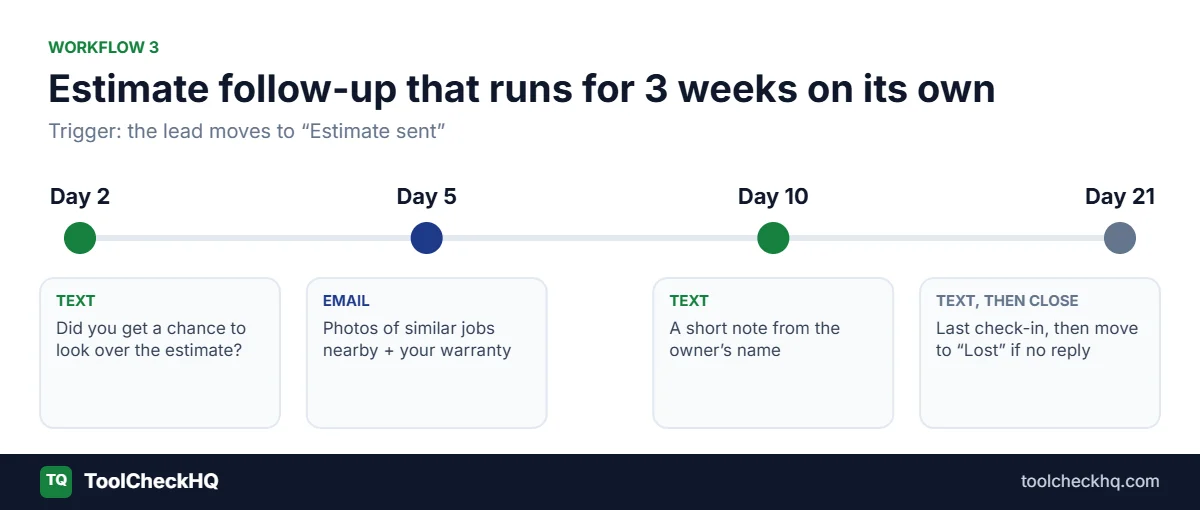
Trigger: the lead moves to “Estimate sent.”
Actions:
- Day 2, text: “Did you get a chance to look over the estimate? Happy to answer any questions.”
- Day 5, email: photos of similar jobs you’ve done nearby, plus your warranty details
- Day 10, text from the owner’s name (homeowners reply to owners)
- Day 21: one last check-in, then move the lead to “Lost” if there’s no reply
A lot of roofers send one follow-up and give up. This sequence keeps going for 3 weeks without anyone lifting a finger, and it’s usually where most of the extra revenue comes from.
4. Insurance claim check-ins
Trigger: the lead moves to “Insurance claim in progress.”
Actions: every 7 days, text the homeowner asking if the adjuster has been out or the claim’s been approved. When they reply, create a task for the rep.
Restoration jobs can stall for weeks while insurance drags its feet. This keeps your name in front of the homeowner the whole time, so another roofer doesn’t slide in.
5. Google review request
Trigger: the lead moves to “Job complete.”
Actions:
- Same day: a thank-you text with a direct link to your Google review page
- Day 3: a gentle reminder if they haven’t clicked
- If they reply with a complaint: alert the owner right away and stop the review messages
More reviews help you show up higher in Google Maps. And that’s where the next storm’s leads come from.
What it costs a roofing company
| Plan | Monthly | Who it’s for |
|---|---|---|
| Starter | $97 | One roofing company doing its own marketing |
| Unlimited | $297 | Roofing marketing agencies with several roofer clients |
| Founder (Pro) | $497 | Agencies reselling GoHighLevel under their own brand |
For a single roofing company, Starter is enough. Our GoHighLevel Starter plan review covers what it includes and where it falls short.
Extra costs to budget for:
- Usage charges. SMS, emails sent, phone numbers and calls are billed on top of the plan. A big storm month means more texts and a bigger bill. I’d set aside some extra for this until you know your normal usage.
- AI add-ons (optional). Voice AI and Conversation AI can answer calls and texts for you, billed by usage. The AI Employee plans cost $50 or $97 per sub-account a month.
- Setup. You can build it yourself (plan on a week or two of evenings), buy a ready-made roofing “snapshot” with the pipeline and workflows already built, or pay an agency to set it up.
Is it worth it? Run the numbers for your own business. If one extra roof replacement a month comes from faster replies and better follow-up, the software pays for itself many times over. If your crews are already booked 3 months out and you’re turning work away, your bottleneck is crews, so put the money there first.
When I’d tell a roofer to skip it
- You’re a small outfit with steady referral work and no lead problem
- Your team won’t spend time on setup, and you won’t pay someone to do it
- What you really need is estimating, measurements and job costing. Get a production CRM first
GoHighLevel has real downsides too, mainly the learning curve and usage costs that move around month to month. I went through them in GoHighLevel limitations.
4 setup mistakes to avoid
1. Texting before you’re registered. In the US, business texting from a local number needs A2P 10DLC registration, and GoHighLevel walks you through it when you set up your number. Do it on day 1. Unregistered texts get filtered or blocked, and approval can take a while.
2. Texting people who never asked. Only text homeowners who contacted you or gave permission (on a form, during a call, at the door). Add a line to your web forms saying you’ll reply by text. It keeps you on the right side of US texting rules and it’s simply good manners.
3. Building 15 workflows in week 1. Start with missed-call text-back and estimate follow-up. Get those running cleanly, then add one workflow a week. Half-built automations that misfire do more harm than no automation.
4. Skipping the “Lost” reason. It feels like admin. But after 3 months, you’ll see exactly why you lose jobs (price, slow response, financing), and that tells you what to fix.
How to get started this week
- Start the 14-day trial. Sign up here.
- Connect your business phone number and switch on missed-call text-back. Fastest win, by a mile.
- Build the 9-stage pipeline above and move your current open leads into it.
- Set up the estimate follow-up workflow. Then go back and drop every open estimate into it.
- Connect your Google Business Profile and turn on review requests.
- Add the rest (speed-to-lead, insurance check-ins, maintenance reminders) over the next couple of weeks.
If you get steps 2 and 4 working inside the trial, you’ll know whether it’s worth paying for.
FAQ
Is GoHighLevel good for roofing companies?
Yes, for lead follow-up, texting, booking inspections and getting reviews. It doesn’t do production work like measurements or job costing, so many roofers use it next to a tool like JobNimbus or AccuLynx.
How much does GoHighLevel cost for a roofer?
$97 a month on Starter, plus usage charges for SMS, email and calls. Agencies with several roofing clients usually go for the $297 Unlimited plan.
Does GoHighLevel replace JobNimbus or AccuLynx?
No. GoHighLevel covers marketing and follow-up. JobNimbus and AccuLynx cover measurements, materials, crews and job costing.
Can GoHighLevel answer my calls?
Yes. Voice AI can answer and handle calls, billed by usage. Missed-call text-back is the simpler and cheaper place to start.
Is there a GoHighLevel template for roofers?
Yes. Roofing “snapshots” (pre-built pipelines, workflows, funnels and text templates) are sold by agencies and on the HighLevel marketplace. Prices vary a lot, so check exactly what’s inside before you buy one.
Is there a free trial?
Yes, 14 days on any plan. Billing starts automatically when it ends unless you cancel.
Can I use GoHighLevel for door-knocking leads?
Yes. Reps can add a homeowner from the mobile app on the doorstep, and that contact drops straight into your pipeline and follow-up texts.
The bottom line
If you’re losing jobs to slow call-backs and estimates that go cold, GoHighLevel fixes that. Start with missed-call text-back and estimate follow-up, because those 2 workflows usually earn back the monthly cost on their own.
Try GoHighLevel free for 14 days, or read the full GoHighLevel review first.
Pricing checked on 17 November 2026 on the official GoHighLevel pricing page. Usage costs for SMS, email, calls and AI change with how much you use them.

Naresh runs ToolCheckHQ and builds affiliate sites and YouTube channels around marketing software. He reviews tools by digging through pricing pages, plan limits, help docs and user complaints, then explains in plain English what a tool really costs and who it suits.