Quick disclosure: ToolCheckHQ may earn a commission if you buy through links on this page, at no extra cost to you. Here’s our affiliate disclosure.
Otter.ai is the meeting notetaker most people try first. It’s been around for years, the free plan is decent, and the transcripts are good.
Then the limits start to bite.
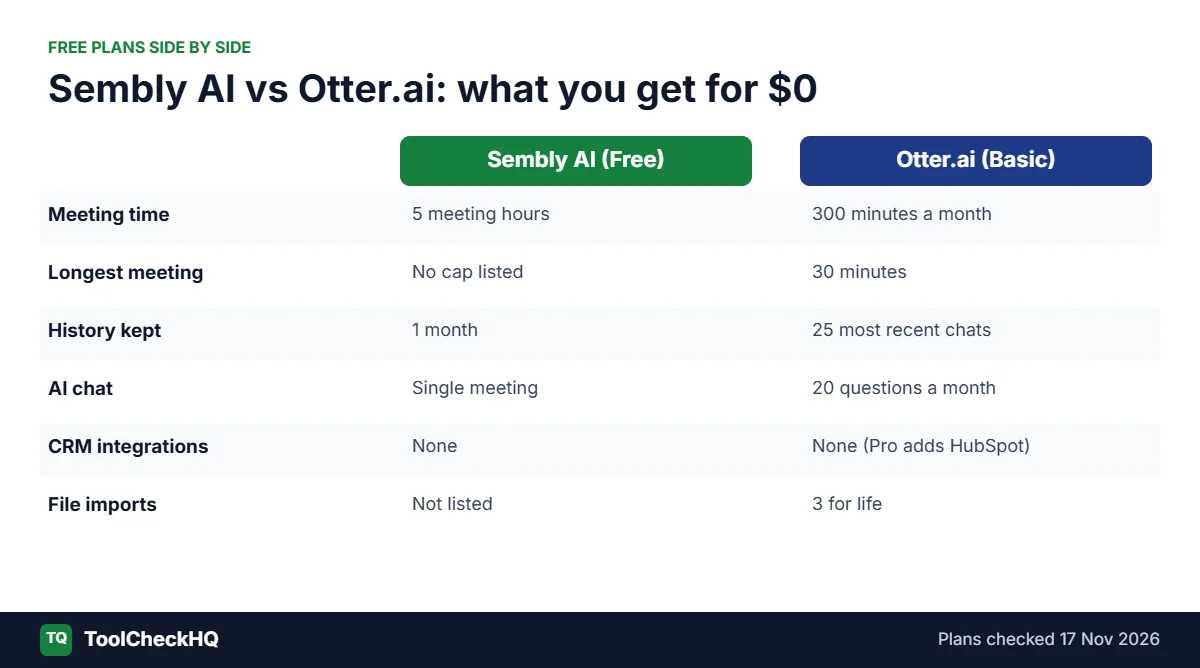
Free meetings cut off at 30 minutes. The Pro plan stops at 1,200 minutes a month. And you get 20 AI chat questions a month on free, which is about one bad week of client calls.
That’s usually when people go looking for something else, and Sembly AI is one of the first names that comes up.
I went through both pricing pages and plan tables in detail. The short version: they’re closer in price than you’d think, and very different in what you get per hour of meetings.
My verdict, up front
Pick Otter.ai if you mainly want a clean, searchable transcript, your meetings are short, and you’d like to stay on a free plan.
Pick Sembly AI if your calendar is packed, your meetings run long, or you want the call turned into notes and follow-up tasks without doing it yourself.
The detail that decides it for most people: Sembly’s Basic plan (about $10 a month, billed yearly) has unlimited meeting hours. Otter’s Pro plan ($8.33 a month, billed yearly) caps you at 1,200 minutes.
1,200 minutes is 20 hours. If you do 2 hours of calls a day, you’ll burn through that by the second week.
Want the full picture on Sembly first? Read my Sembly AI review and the Sembly AI pricing guide. For more options, see the Sembly vs Fireflies vs Fathom vs Otter comparison.
At a glance
| Sembly AI | Otter.ai | |
|---|---|---|
| Free plan | 5 meeting hours, 1 user, 1-month history | 300 min/month, 30 min per meeting, last 25 conversations |
| Cheapest paid plan | Basic, about $10/month yearly | Pro, $8.33/month yearly |
| Meeting time on cheapest paid plan | Unlimited hours | 1,200 min/month |
| Longest single meeting (cheapest paid) | No cap listed | 90 min |
| AI chat | 1 meeting at a time (Basic), across meetings (Pro and up) | 50 questions/month (Pro) |
| Languages | 45+ | Multiple languages |
| Integrations (cheapest paid) | 1 plus Zapier | Salesforce, HubSpot, Zapier |
| Team plan | Pro, about $20/user/month yearly | Business, $19.99/user/month yearly |
| Best for | Busy calendars, long meetings, turning calls into work | Transcripts, interviews, light users |
Pricing, plan by plan
Sembly AI
| Plan | Yearly billing | Monthly billing | Seats | Meeting hours |
|---|---|---|---|---|
| Free | $0 | $0 | 1 | 5 hours |
| Basic | about $10/month | about $14/month | 1 | Unlimited |
| Pro | about $20/user/month | about $29/user/month | 1 to 40 | Unlimited |
| MAX | about $30/user/month | about $39/user/month | 3 minimum | Unlimited |
| Enterprise | Custom | Custom | 10 minimum | Unlimited |
A heads-up: Sembly’s own pricing page shows slightly different numbers in different spots (the comparison table and the FAQ don’t fully match). So I’ve written “about,” and you should check the price at checkout.
When I checked, Sembly was also running a Black Friday deal: 20% off any plan for 12 months with code BF2026, ending 30 November 2026.
The free plan gives you 5 meeting hours. Meeting history only stays for 1 month, and you don’t get integrations or AI chat across meetings. It’s enough to test Sembly on a week of real calls, and too small to live on.
Otter.ai
| Plan | Yearly billing | Monthly billing | Transcription | Max per meeting |
|---|---|---|---|---|
| Basic | Free | Free | 300 min/month | 30 min |
| Pro | $8.33/month | $16.99/month | 1,200 min/month | 90 min |
| Business | $19.99/user/month | $30/user/month | Unlimited meetings | 4 hours |
| Enterprise | Custom | Custom | Unlimited | 4 hours |
Otter’s free plan has a few limits worth knowing before you build a habit around it:
- Only 3 imported files for life, not per month
- Only your 25 most recent conversations are kept
- 20 AI chat questions a month, max 3 per conversation
- Playback at 1x speed only
For a student recording the odd lecture, that’s fine. For anyone in sales or consulting, you’ll outgrow it fast.
What an hour of meetings actually costs you

This is the comparison that matters if you’re busy.
Say you average 40 hours of meetings a month. That’s about 2 hours a working day, which is normal for a consultant, founder, recruiter or account manager.
- Otter Pro ($8.33/month) only covers 20 of those hours. To get unlimited meetings, you’d move to Business at $19.99/month.
- Sembly Basic (about $10/month) covers all 40.
So for a heavy solo user, Sembly Basic gets you roughly what Otter Business does, for about half the money.
Now flip it. If you have under 20 hours of meetings a month, Otter Pro is the cheaper of the two by a dollar or two, and it comes with Salesforce and HubSpot sync. For a light user on a budget, that’s a good deal.
Feature by feature
Transcription quality and tools
Otter built its name on transcription, and it’s still the thing it does best.
You get live transcription during the call, speaker labels, audio playback synced to the text, and custom vocabulary so client names and product terms come out right. Journalists and researchers like it for a reason: if you need the exact words someone said, Otter is very good at that.
Sembly transcribes in 45+ languages too, and most of its newer features are about what happens after the meeting.
If transcripts are the whole job, I’d pick Otter.
What happens after the meeting
This is where Sembly pulls ahead.
The newer versions of Sembly are built around turning a call into finished work: structured notes, action items, follow-up documents, even slide decks. Paid plans get monthly “Studio credits” for creating those. Pro and MAX add things like risk and issue tracking, sentiment analysis, an analytics dashboard and collections of related meetings.
Take a 45-minute client kickoff call. Otter gives you a transcript and a summary. Sembly gives you the summary, a list of who owes what by when, and a recap you can send to the client.
Otter has summaries, action items and AI workflows too. It’s just less focused on producing documents for you.
If you hate writing up meetings, Sembly is the better pick.
AI chat
Both let you ask questions about a meeting. (“What did they say about the budget?” “When’s the deadline?”)
- Otter: 20 questions a month on free, 50 on Pro, 200 on Business
- Sembly: chat about one meeting at a time on Basic. Pro and up add chat across many meetings, so you can ask “What has this client asked for over the last 5 calls?”
That cross-meeting chat is the feature I’d actually pay for. It turns months of calls into something you can search by asking a question.
Integrations
At the cheap end, Otter is ahead. The $8.33 Pro plan includes Salesforce, HubSpot and Zapier, which is good value for a salesperson.
Sembly Basic gets you 1 integration plus Zapier. Pro bumps it to 5 and MAX to 20.
So if CRM sync on a tight budget is your priority, Otter Pro wins.
Long meetings
Otter’s free plan stops at 30 minutes per conversation, and Pro stops at 90. A 2-hour workshop or strategy session on Otter Pro gets cut off partway.
Sembly’s paid plans list unlimited meeting hours, with no per-meeting cap on the pricing page.
If your calls regularly run past 90 minutes, this alone settles it.
Teams
At the team level, prices are almost identical: Otter Business at $19.99 a user and Sembly Pro at about $20 a user, both billed yearly.
Otter Business adds unlimited meetings, 4-hour meetings and admin features like usage analytics. Sembly Pro adds cross-meeting AI chat and more integrations.
One thing to watch: Sembly MAX needs at least 3 seats, and Enterprise needs at least 10. A 2-person team can’t buy MAX.
I’d call this one a tie. Pick based on whether you’d use the admin analytics (Otter) or the cross-meeting AI (Sembly) more.
What I’d watch out for
With Sembly: the pricing page doesn’t fully agree with itself. The comparison table, the plan cards and the FAQ show slightly different prices and credit amounts. Check what you’re charged at checkout, and screenshot it.
Sembly also has a much smaller review base. On G2’s comparison page, Sembly had 46 reviews against Otter’s 502 when I looked. So there’s less real-world feedback to go on. Lean on the free plan before you pay.
With Otter: the free plan’s 25-conversation memory catches people out. Your older meetings drop off unless you upgrade or export them. And the 90-minute cap on Pro is easy to forget until a long call gets cut off halfway.
Who should pick Otter.ai
- Students, journalists and researchers who need accurate transcripts
- People with short meetings who can stay on the free plan
- Salespeople who want HubSpot or Salesforce sync for under $10 a month
- Anyone with fewer than 20 hours of meetings a month
Who should pick Sembly AI
- Consultants, founders, recruiters and managers with full calendars
- Anyone whose meetings often go past 90 minutes
- Teams that want to search months of calls by asking a question
- People who want recaps and task lists written for them
If that second list sounds like you, start with Sembly’s free plan. 5 hours is enough to run it on a few real client calls and see if the summaries save you time.
A quick way to decide in 2 minutes
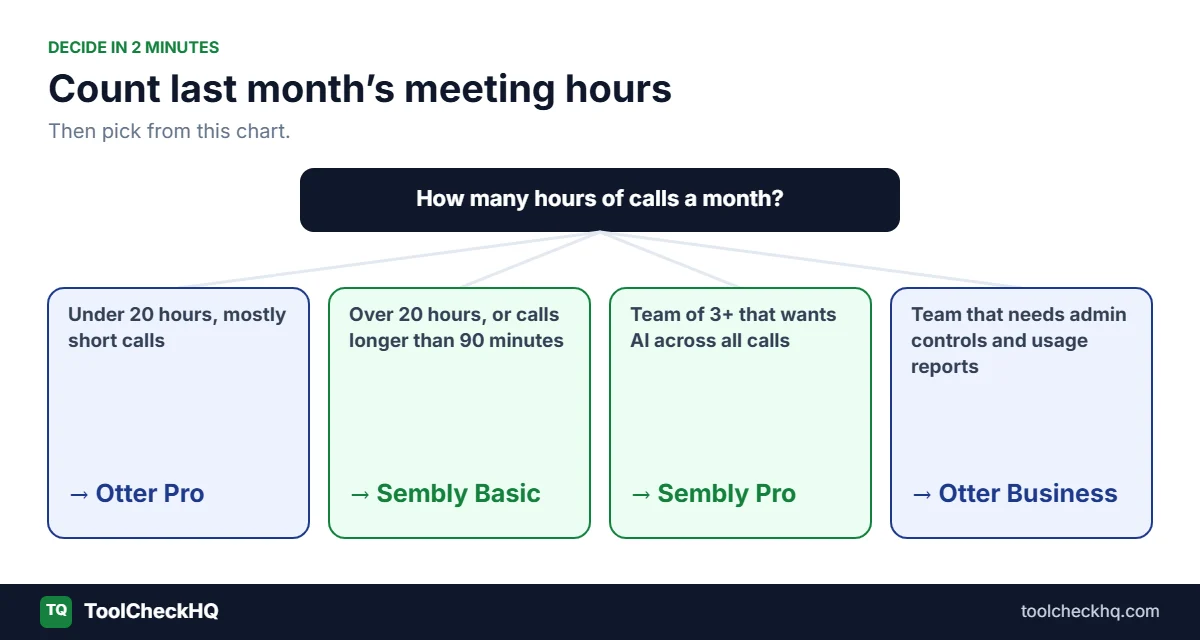
Open your calendar and count last month’s meeting hours.
- Under 20 hours, mostly short calls: Otter Pro, or stay on Otter free.
- Over 20 hours, or calls longer than 90 minutes: Sembly Basic.
- A team of 3+ that wants AI across all its calls: Sembly Pro.
- A team that cares most about admin controls and usage reports: Otter Business.
That’s honestly most of the decision.
FAQ
Is Sembly AI better than Otter.ai?
For busy schedules and long meetings, yes. Sembly’s cheapest paid plan has unlimited meeting hours, while Otter Pro stops at 1,200 minutes a month. For pure transcription and light use, Otter is better and a little cheaper.
Is Sembly AI free?
There’s a free plan with 5 meeting hours for 1 user. History is kept for 1 month, and integrations aren’t included.
What are Otter.ai’s free plan limits?
300 minutes a month, 30 minutes per conversation, 3 file imports for life, your 25 most recent conversations, and 20 AI chat questions a month.
Do both work with Zoom, Google Meet and Microsoft Teams?
Yes. Both join meetings on all 3 platforms.
Which is cheaper, Sembly or Otter?
At the entry level, Otter Pro ($8.33/month yearly) is slightly cheaper than Sembly Basic (about $10/month yearly). Per hour of meetings, Sembly is much cheaper once you pass 20 hours a month.
What’s a good Otter.ai alternative for long meetings?
Sembly AI. Otter cuts meetings off at 30 minutes on free and 90 minutes on Pro. Sembly’s paid plans don’t list a meeting length cap.
Does Sembly have a discount right now?
When I checked on 17 November 2026, Sembly had 20% off any plan for 12 months with code BF2026, valid until 30 November 2026.
The bottom line
Otter.ai is the better transcriber. Sembly AI is the better deal once meetings take over your week.
If you’re on calls more than 20 hours a month, or they keep running past 90 minutes, try Sembly AI free and run it on a week of your real meetings.
Prices checked on 17 November 2026 on the official Sembly AI and Otter.ai pricing pages (US prices). Both companies change plans often, so check before you buy.

Naresh runs ToolCheckHQ and builds affiliate sites and YouTube channels around marketing software. He reviews tools by digging through pricing pages, plan limits, help docs and user complaints, then explains in plain English what a tool really costs and who it suits.