Disclosure: ToolCheckHQ may earn a commission if you buy through links on this page. It costs you nothing extra. Read our affiliate disclosure.
Most people leave a meeting with half a page of notes and a fuzzy memory of who agreed to do what.
Sembly AI tries to fix that. A bot joins your call, records it, writes the notes, lists the tasks, and can turn the discussion into a proposal or a slide deck.
This Sembly AI review covers what the tool does, what each plan costs, where the pricing gets tricky, and who should pick it. I based it on Sembly’s own pricing page and help pages and on public user reviews. I did not run my own client calls through it.
Sembly AI at a glance
- Best for: consultants, agencies, project managers and other client-facing teams
- Works with: Zoom, Google Meet, Microsoft Teams and Webex
- Starting price: $10 a month billed yearly
- Free options: a Free plan with 5 meeting hours, plus a 7-day free trial on paid plans
- Languages: 45+
- Security: SOC 2 Type II and GDPR
- G2 rating: 4.6 out of 5 from about 46 reviews
What is Sembly AI?
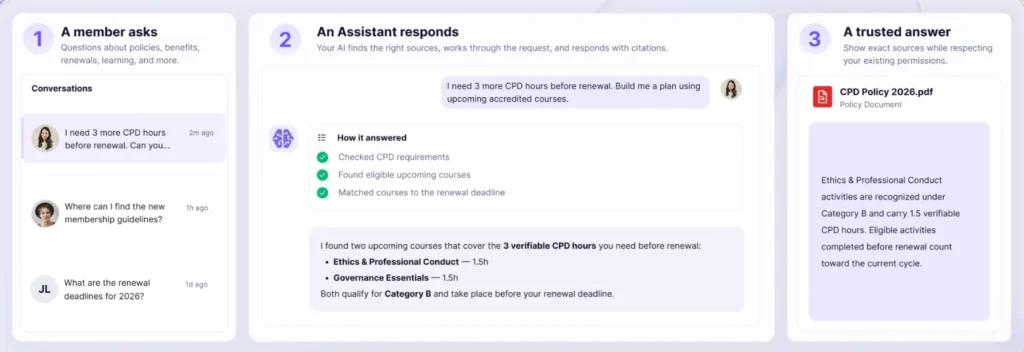
Sembly is an AI meeting assistant for teams that work with clients. A bot joins your Zoom, Google Meet, Microsoft Teams or Webex call, records it, and writes up what happened.
The company has been building the product since 2019, so it has a longer track record than many newer notetaker apps.
Sembly describes itself as an end-to-end meeting agent. After the call, it goes past notes and produces the documents that follow, such as proposals, statements of work, status reports, case studies and pitch decks.
Those come out as editable Word and PowerPoint files. That is the main reason to look at Sembly instead of a plain transcription tool.
Sembly AI features
Meeting notes and summaries
Within minutes of a call ending, Sembly gives you a transcript, a summary, key topics and next steps. The notes follow a template matched to the type of meeting.
A client call and an internal check-in get different layouts. That saves you from reformatting every recap by hand.
Tasks and action items
Sembly pulls tasks out of the conversation automatically. Task detection is included on every plan.
You can push those tasks to other apps through its integrations, so they land where your team already works.
Multi-meeting AI chat
Sembly’s assistant is called Semblian. On Pro and above, you can ask it questions across many meetings at once, like what a client said about budget over the last month.
Basic limits chat to one meeting at a time. That gap is a big reason to pick Pro.
AI artifacts and client branding
This is the feature Sembly pushes hardest. Sembly turns what it has learned from your meetings into finished files: presentations, reports, case studies and sales pitches.
Each customer gets a client space inside your workspace, with its own branding. The files you generate for that customer arrive in their colors and style, ready to export as .pptx or .docx.
The work runs on monthly Studio credits, which I explain in the pricing section.
Integrations
Sembly lists 35+ native integrations, plus Zapier and webhooks. It can also sync notes and tasks into HubSpot.
Through MCP, tools like Claude, Cursor and n8n can read your meeting data. That comes with Pro and above.
Languages and speaker labels
Transcripts carry timestamps and speaker identification. Sembly supports 45+ languages and mixed-language meetings, so an international team can use one tool.
Analytics and sentiment
Pro adds an analytics dashboard with meeting counts, hours and participation. It also adds sentiment analysis and risk detection.
A team lead can report from that dashboard without exporting anything.
See what Sembly can do on a free trial
Sembly AI pricing
The numbers below come from Sembly’s pricing page, which I checked on November 18, 2026. Prices shift, so confirm them on the page before you pay.
| Plan | Billed yearly | Billed monthly | Users | Studio credits per user each month |
|---|---|---|---|---|
| Free | $0 | $0 | 1 | None, plus a one-time starter bonus |
| Basic | $10 a month | $14 a month | 1 only | About 2,500 |
| Pro | $20 per user | $29 per user | Up to 40 | About 3,000 |
| MAX | $30 per user | $39 per user | 3 minimum, up to 500 | About 3,500 |
| Enterprise | Custom quote | Custom quote | 10 minimum | About 3,500 |
Sembly’s page shows slightly different credit numbers in different spots. Check the current figure when you sign up.
Meeting hours are unlimited on every paid plan. The Free plan covers 5 hours.
Sembly AI Black Friday deal
Sembly is running a Black Friday offer through November 30, 2026. Use code BF2026 at checkout for 20% off any plan, on any billing period, for 12 months.
That brings the yearly-billed prices down to $8 a month for Basic, $16 per user for Pro and $24 per user for MAX.
Claim the Sembly Black Friday discount
Three pricing rules to know before you sign up
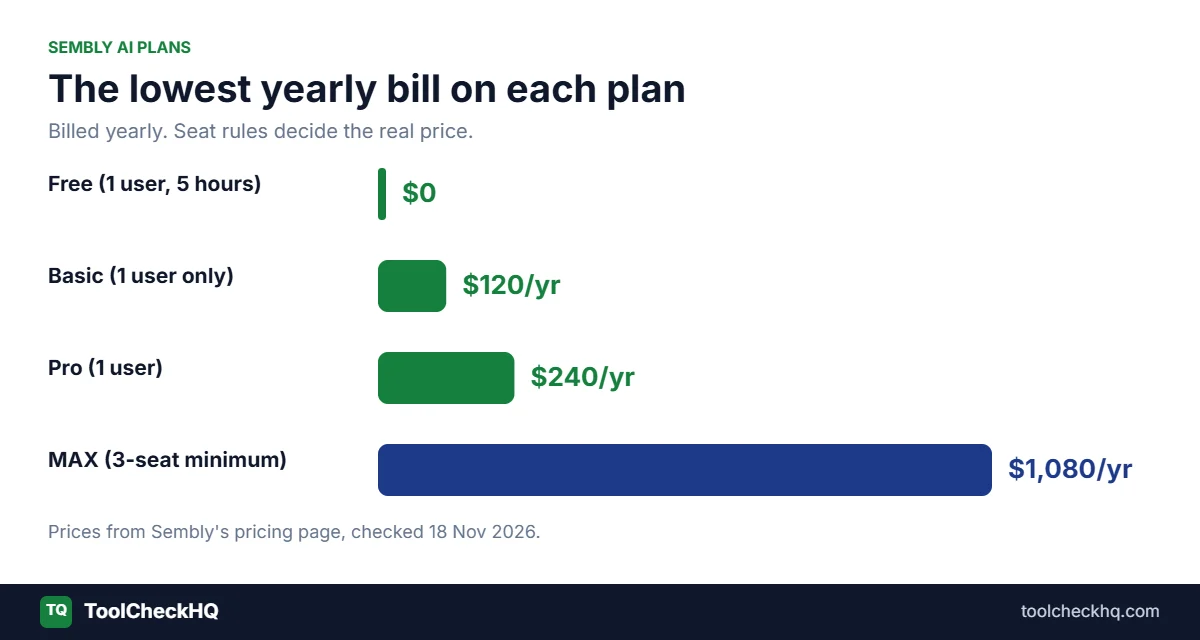
Basic is for one person only. The moment a colleague joins, you need Pro. Two people on Pro cost $40 a month billed yearly.
MAX needs at least three users. Sembly’s help center says it creates three seats at signup and bills all three once the trial ends. On yearly billing that puts the lowest MAX bill at $1,080 a year, even for a solo user.
Studio credits are the real meter. Credits pay for the AI work Sembly does for you, such as generating a deck or report. Unused credits expire at the end of the month on Basic and Pro.
You can buy extra credits, but the pricing page does not show what they cost. Ask before you plan around heavy use.
The yearly discount also changes by plan. Going annual saves about 29% on Basic, 31% on Pro and 23% on MAX, based on Sembly’s own rates.
Does Sembly AI have a free plan?
Yes. The pricing page I checked on November 18, 2026 lists a Free plan at $0. It covers one user, 5 meeting hours, one month of history, notes, tasks and basic AI chat.
Some older articles say Sembly removed its free plan in March 2026. Check the pricing page yourself, since Sembly changes its plans often.
Paid plans start with a 7-day free trial. That is a short window for judging a tool you plan to use for months.
Which Sembly AI plan should you pick?
- Just trying it out: the Free plan
- One person who wants searchable notes: Basic at $120 a year
- Two or more people who want chat across meetings and branded documents: Pro
- A team that needs SSO, an audit log or HIPAA: MAX
- A large company with a formal security review: Enterprise
Start on monthly billing if you are unsure. You pay a bit more, and you can leave after a real billing cycle.
Check the current Sembly plans
Sembly AI pros and cons
Pros
- Turns meetings into proposals, reports and decks
- Client spaces with their own branding
- Unlimited meeting hours on paid plans
- Free plan available for testing
- Joins Zoom, Google Meet, Microsoft Teams and Webex
- Supports 45+ languages
- SOC 2 Type II and GDPR compliance on every plan
- Strong G2 rating of 4.6 out of 5
Cons
- Pricing steps depend on seat rules, so small teams see jumps
- Credit limits, and extra credits have no listed price
- A 7-day paid trial is short
- SSO, audit log and HIPAA only on MAX
- Some reviewers report editing problems and limited meeting types
- Credit numbers differ in places on Sembly’s own page
What users say about Sembly AI
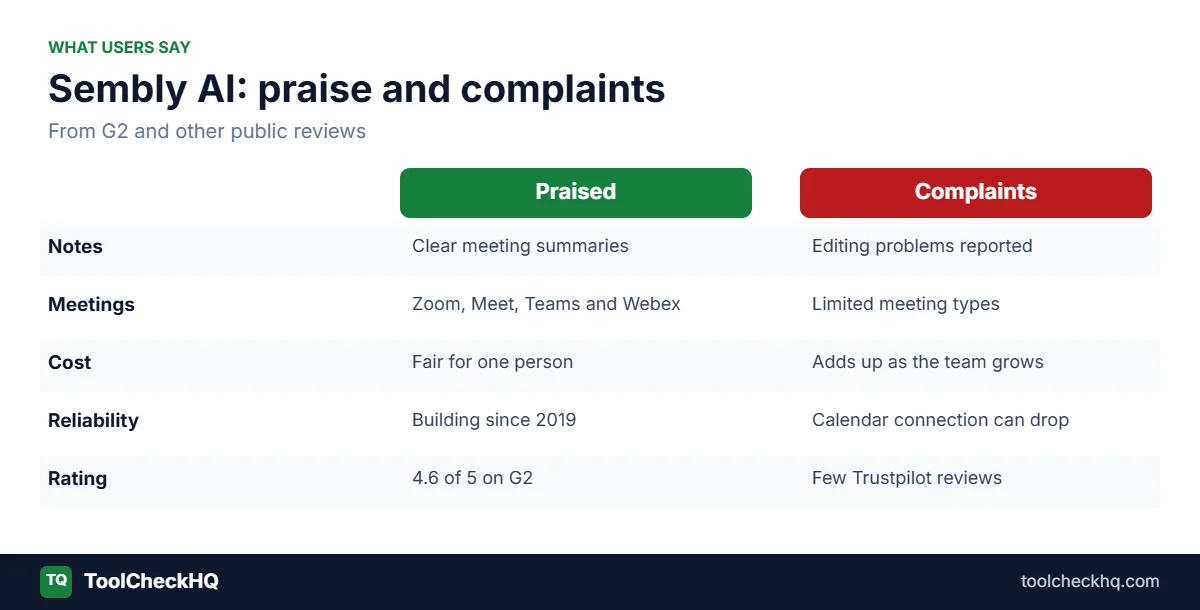
Sembly holds 4.6 out of 5 on G2 from about 46 reviews. Reviewers praise the meeting summaries.
The complaints are specific. Some users mention editing problems and a narrow set of meeting types.
One five-star reviewer, a CEO, said the cost adds up as you add team members. A three-star reviewer said Sembly offers the same features as similar tools and that they would choose based on price.
Another reviewer reported an invoice problem that support could not fix. Trustpilot has only a few reviews, which is too small a sample to read much into.
One comparison article also mentions that Sembly sometimes drops its calendar connection. Check that during your trial.
Sembly AI security and privacy
Sembly holds SOC 2 Type II certification and operates in line with GDPR. Its Trust Center lists security documents and subprocessors you can review before buying.
HIPAA compliance, custom SSO and an audit log come with MAX and above.
On training data, Sembly says every plan manages model training through opt-out settings, so your audio, video and text stay out of training if you choose.
If your company has strict rules, ask Sembly about this before you roll it out.
Who should use Sembly AI
- Consultants and agencies who write proposals and reports after client calls
- Freelancers who want branded deliverables for each client
- Project managers who want a searchable history of every meeting
- Small teams of two to forty people that fit the Pro plan
- Multilingual teams that need one tool for many languages
Who should skip Sembly AI
- Solo users who only need a transcript, since cheaper or free tools may do the job
- Two-person teams that need SSO, because the MAX floor is $1,080 a year
- Heavy document users who may run through their monthly credits
- Sales teams that want call scoring, since one comparison article notes Sembly has no revenue intelligence
How Sembly AI compares with other AI notetakers
Tools like Fireflies, Fathom and Otter focus on recording, transcripts and summaries. Sembly says its edge is finishing the workflow with client documents.
If all you need is notes, that extra step may not justify the price. If you write proposals and reports after most calls, it could pay for itself.
I compared them head to head in Sembly vs Fireflies vs Fathom vs Otter and in a closer look at Sembly AI vs Otter.ai.
How to get started with Sembly AI
- Start with the Free plan or the 7-day trial through the link on this page.
- Connect your calendar so the bot can join scheduled calls.
- Invite Sembly to your next Zoom, Google Meet, Microsoft Teams or Webex meeting.
- Review the notes and tasks it creates.
- Set up a client, add their branding and generate a document from that meeting.
- Watch your credit balance during the trial so you can pick the right plan.
Final verdict
Sembly AI is a good pick for client-facing teams that spend time turning calls into documents. The branded deliverables are the reason to pay.
The weak spots are the pricing rules. Basic stops at one user, MAX needs three, and credits cap how much AI work you can generate each month.
My advice is simple. Start free, run a few real meetings, and see how many credits a typical document uses. Choose monthly billing before you commit to a year.
If you only want a transcript, shop around first. If you write proposals and reports after calls, Sembly deserves a look.
Sembly AI FAQ
Is Sembly AI worth it?
It is worth it if you create client documents after meetings and need searchable meeting history. If you only want a transcript, a cheaper tool may fit better.
How much does Sembly AI cost?
Billed yearly, Basic is $10 a month, Pro is $20 per user and MAX is $30 per user. Billed monthly, the same plans cost $14, $29 and $39. Enterprise is a custom quote.
Does Sembly AI have a free plan?
Yes. The pricing page lists a Free plan with one user, 5 meeting hours and one month of history. Paid plans also start with a 7-day free trial.
Is there a Sembly AI Black Friday discount?
Yes. Sembly lists code BF2026 for 20% off any plan for 12 months, valid through November 30, 2026.
What are Sembly Studio credits?
Credits pay for the AI work Sembly does for you, such as building a report or presentation. Each user gets a monthly allowance, and unused credits expire at month end on Basic and Pro.
Does Sembly AI work with Zoom and Microsoft Teams?
Yes. It works with Zoom, Google Meet, Microsoft Teams and Webex on every plan.
Is Sembly AI safe?
Sembly holds SOC 2 Type II certification and follows GDPR on all plans. HIPAA, SSO and an audit log need MAX or Enterprise.
Can Sembly AI record in-person meetings?
Yes. It records through your microphone, and that works on every plan.
Last updated: November 18, 2026. Pricing, credits and promotions can change, so confirm them on Sembly’s website before you buy.

Naresh runs ToolCheckHQ and builds affiliate sites and YouTube channels around marketing software. He reviews tools by digging through pricing pages, plan limits, help docs and user complaints, then explains in plain English what a tool really costs and who it suits.