
Quick disclosure: ToolCheckHQ may earn a commission if you buy through links on this page, at no extra cost to you. Here’s our affiliate disclosure.
The welcome email is the one email almost everyone opens.
Someone just gave you their address a few seconds ago. They remember you. They’re waiting for the freebie you promised. You’ll never have their attention like this again.
So if you only set up one automation in Moosend, make it this one.
This guide walks through it step by step, based on Moosend’s own help docs and walkthroughs. I’ve also written 5 welcome emails you can copy and edit, because a blank editor is the part that stops most people.
What you’ll build
Here’s the sequence in plain words:
- Someone joins your list.
- Moosend sends welcome email 1 right away.
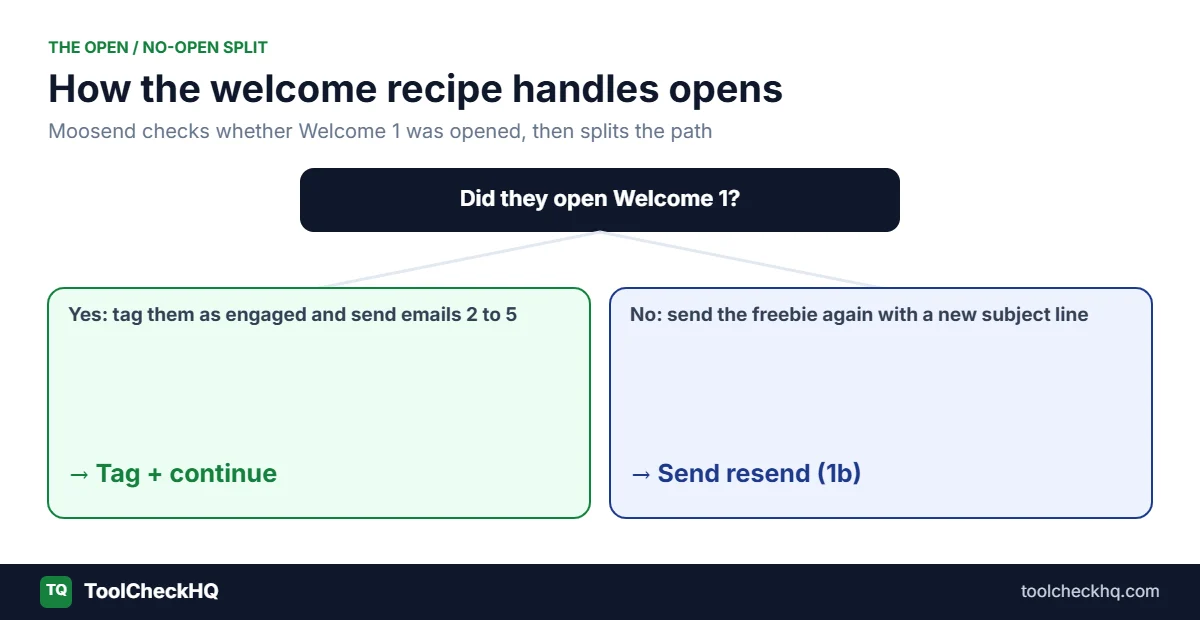
- It waits a day or two and checks: did they open it?
- Opened: they get tagged as engaged and continue to the next emails.
- Didn’t open: they get a second try with a new subject line.
- Over the next week or so, everyone gets the rest of the series.
Moosend has a ready-made recipe for this, so you aren’t building it from zero.
Before you start
Have these ready. It makes the setup go much faster.
- A mailing list that new subscribers join. One main list is fine for most people.
- A signup form or landing page connected to that list. Moosend’s form builder has inline forms, popups, floating bars, floating boxes and full-page forms.
- Your sending domain set up, with SPF, DKIM and DMARC records added. Moosend shows you what to copy into your domain settings.
- Your freebie, if you promised one. Upload the PDF somewhere you can link to.
- Your emails written. Grab the templates further down and edit them first.
If you’re new to the app, our how to use Moosend guide covers lists, forms and domains.
Don’t have an account yet? Start the free 30-day trial. It covers up to 1,000 contacts. Note that the trial only allows 1 automation, which is fine for this guide.
Step 1: create the welcome emails as campaigns
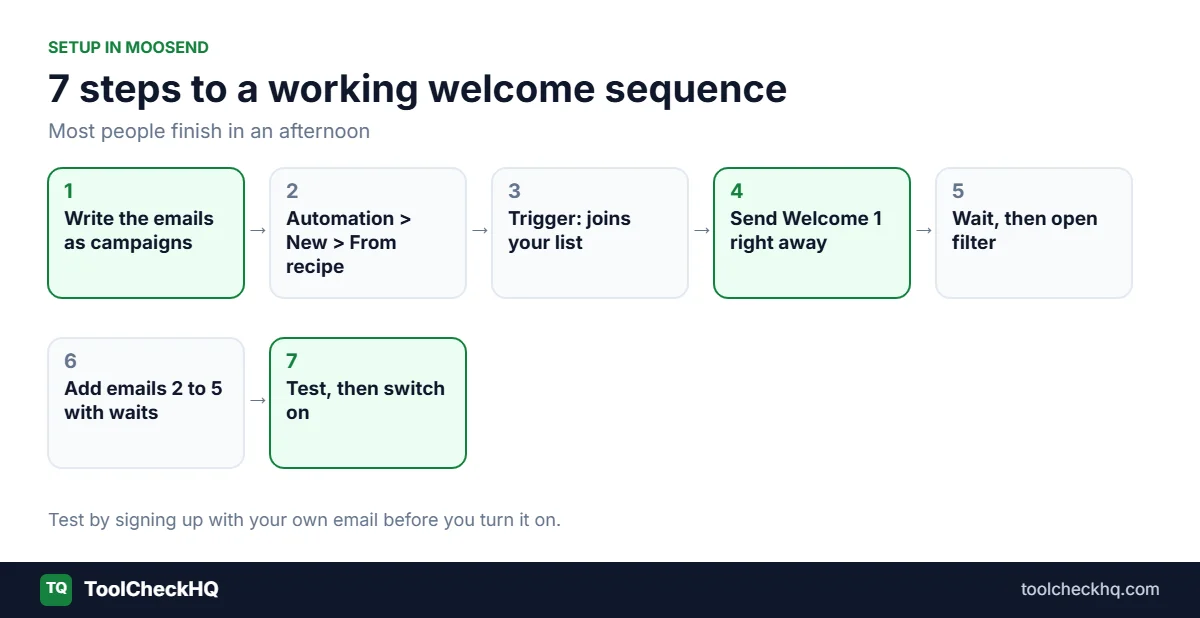
In Moosend, the emails inside an automation are built as campaigns first. Go to Campaigns and create a new one for each welcome email. Use the drag-and-drop editor or start from one of Moosend’s welcome templates.
Name them so you can find them later:
- Welcome 1: freebie
- Welcome 1b: resend
- Welcome 2: best advice
- Welcome 3: my story
- Welcome 4: top resources
- Welcome 5: next step
Save them without sending. You’ll pick them from a list in the automation builder.
Step 2: start from the welcome recipe
According to Moosend’s walkthrough:
- On the menu bar, click Automation.
- Click New, then From recipe.
- In the recipes list, find Welcome email sequence and select it.
- Give the automation a name, like “Welcome series, main list,” and save.
Moosend opens the visual builder with the steps already laid out. Each box is a step you can click and edit.
Step 3: set the trigger
The trigger is what starts the sequence. Click it and choose when someone subscribes to a list, then pick your main list.
If you have more than one signup form (say, one for a checklist and one for a cheat sheet), you can build a separate welcome automation for each one. That way each person gets the freebie they actually asked for.
Step 4: send welcome email 1
Click the first action step and choose your Welcome 1: freebie campaign.
Moosend’s academy suggests setting the limit to up to 1 email per day from this step. That stops someone getting the same welcome twice if they sign up again by accident.
Should email 1 go out instantly?
Mostly yes. People expect it within a minute or two, especially if they’re waiting for a download. Moosend’s tutorial also shows a “wait a specific time interval” step if you’d like a short pause, like 5 minutes. I’d keep any delay short.
Step 5: wait, then split by opens
Add a wait step. One or two days is normal.
Then add the filter (if / else) step. In the filter settings:
- choose the list the subscribers are on
- set the condition to opened campaign, and pick Welcome 1
Now the path splits in two.
“Yes” path (opened): add a tag action, like engaged-welcome. Tags help later, when you want to send something only to your most active readers.
“No” path (didn’t open): send Welcome 1b: resend. It’s the same freebie with a new subject line. A lot of first emails get buried, and a second try often gets opened.
Step 6: add the rest of the series
After the split, add the remaining emails with a wait step between each one:
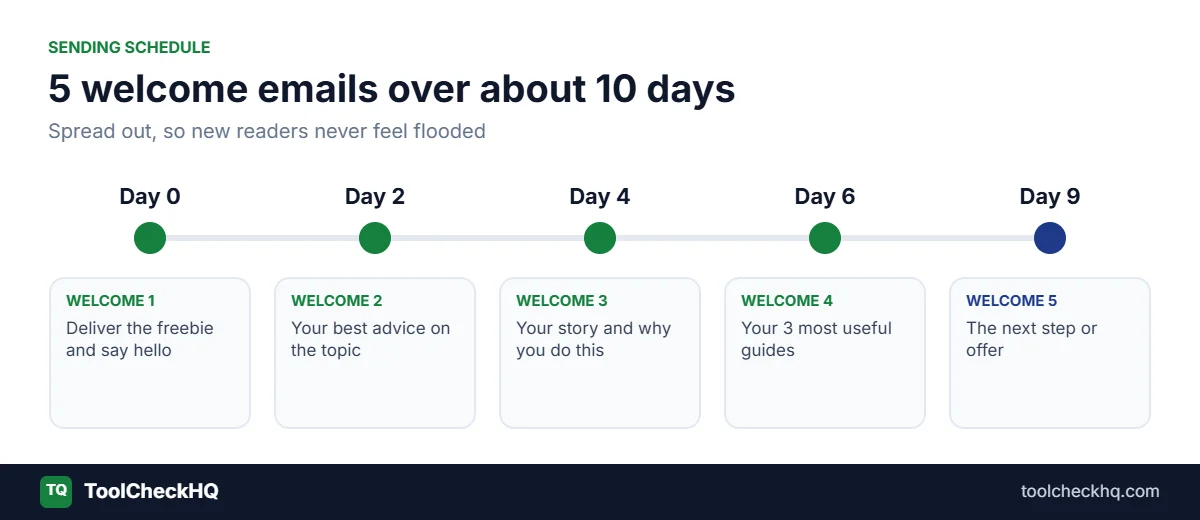
| Step | Wait before it | |
|---|---|---|
| Welcome 2 | 2 days | Your best advice |
| Welcome 3 | 2 days | Your story and why you do this |
| Welcome 4 | 2 days | Your top resources or posts |
| Welcome 5 | 3 days | The next step (product, offer or newsletter) |
That’s about 9 to 10 days from signup to the last email. After that, they join your normal newsletter.
You can add more later. Five is a good start.
Step 7: test before you switch it on
Do this every time. It takes 5 minutes and saves embarrassing mistakes.
- Sign up through your own form with a personal email address.
- Check that Welcome 1 arrives, and the freebie link works.
- Open it on your phone. Most of your readers will.
- Check the spam folder and the Promotions tab in Gmail.
- Click every link.
When it all works, set the automation to active.
5 welcome emails you can copy
Edit the bits in [brackets]. Keep them short. Welcome emails that read like a note from a person tend to do better than glossy designed ones, at least for blogs and small businesses.
Welcome 1: deliver the freebie (send right away)
Subject: Here’s your [freebie name]
Preview text: As promised. It takes 2 minutes to read.
Hi [first name],
Thanks for joining. Here’s the [freebie name] you asked for:
[Download link]
Quick tip: start with [section or page]. It’s the part most people find useful first.
Over the next week I’ll send you a few short emails with [what they’ll learn]. If they’re not for you, the unsubscribe link is at the bottom, no hard feelings.
[Your name]
P.S. Hit reply and tell me what you’re working on. I read every reply.
That P.S. matters. Replies tell Gmail and other inboxes that people want your emails.
Welcome 1b: the resend (for people who didn’t open)
Subject: Did this get lost? Your [freebie name] is inside
Preview text: Here’s the link again.
Hi [first name],
Inboxes get busy, so here’s your [freebie name] again in case the first email got buried:
[Download link]
[Your name]
Welcome 2: your best advice (2 days later)
Subject: The [topic] mistake I see most often
Preview text: And the 1 thing to do instead.
Hi [first name],
When people start with [topic], the most common mistake is [mistake].
It’s easy to see why. [One sentence on why people do it.]
Here’s what works better: [your tip, in 2 or 3 short sentences].
I wrote about this in more detail here: [link to your best blog post].
[Your name]
Welcome 3: who you are (2 days later)
Subject: Why I started [blog or business name]
Preview text: The short version.
Hi [first name],
Quick story. [2 to 4 sentences about why you started. Keep it real and specific.]
That’s why everything I send you is about [topic], and why I try to keep it practical.
What’s your biggest challenge with [topic] right now? Reply and let me know. It helps me write emails you’ll actually use.
[Your name]
Welcome 4: your best stuff (2 days later)
Subject: My 3 most useful [topic] guides
Preview text: Start with whichever fits you.
Hi [first name],
If you only read 3 things I’ve written, make it these:
- [Post 1 title]: [one line on who it’s for]
- [Post 2 title]: [one line]
- [Post 3 title]: [one line]
[Your name]
Welcome 5: the next step (3 days later)
Subject: What’s next
Preview text: Here’s what you’ll get from me from now on.
Hi [first name],
That’s the end of the welcome emails. From here, you’ll get my [weekly/monthly] newsletter on [day], with [what’s in it].
If you want help faster, [your offer: a product, a tool you recommend, a course, a call]. Here’s the link: [link]
Either way, thanks for being here.
[Your name]
If the link in email 5 is an affiliate link, add a short disclosure, like “I earn a commission if you buy through this link, at no extra cost to you.” Our guide on Moosend for affiliate marketing covers the rules in more detail.
Common mistakes
Selling in email 1. Deliver the freebie and say hello. The pitch can wait until email 4 or 5.
A broken freebie link. Test it. Then test it again on your phone.
Too many emails too fast. Five emails in 3 days feels like a flood. Spread them over a week or so.
No reply prompt. Asking for a reply builds a relationship and helps your emails land in the inbox.
Forgetting the resend path. The open/no-open split is the most useful part of Moosend’s recipe. Use it.
Never checking the numbers. Look at open and click rates per email after the first 100 subscribers go through. If one email drops off sharply, rewrite its subject line.
What good numbers look like
Benchmarks vary a lot by industry and by how you collect emails, so I won’t give you exact targets. What I’d look for:
- Welcome 1 should have your highest open rate of any email you send.
- Opens should drop slowly from email 1 to email 5. A sudden drop means that email’s subject line isn’t working.
- Clicks matter more than opens. Apple Mail and other apps can make open rates look higher than they are.
Moosend’s campaign reports show opens and clicks for each email in the automation.
Does this work for online stores too?
Yes, with small changes. For a store, email 1 often includes a first-order discount, and the later emails show best sellers or reviews. Moosend has a separate ecommerce welcome tutorial in its academy, and its recipes list includes a “new customer thank you” email for people who just bought.
FAQ
Does Moosend have a welcome email template?
Yes. There’s a ready-made “Welcome email sequence” recipe in the automation section, plus welcome email designs in the campaign editor.
How many emails should a welcome sequence have?
Three to five is a good start for most blogs and small businesses. You can add more once you see how people respond.
Can I resend the welcome email to people who didn’t open it?
Yes. Moosend’s recipe includes an if/else filter that checks for opens, so you can send a second version only to people who didn’t open the first.
Can I use a welcome sequence on the free trial?
Yes. The 30-day trial allows 1 automation, so the welcome series is the one I’d build.
How much does Moosend cost after the trial?
Pro starts at $9 a month for 500 subscribers and $16 a month for 1,000, with unlimited sends. Full details in our Moosend pricing guide.
The bottom line
A welcome sequence is the one automation that pays off for every kind of list: blogs, stores, coaches, affiliate sites. Moosend makes it quick, because the recipe already has the open/no-open split built in. Your real job is writing 5 good emails, and the templates above get you most of the way.
Start your free Moosend trial and build your welcome series today. If you’re still choosing a tool, see our Moosend review or the guide to Moosend for bloggers.
Steps checked against Moosend’s help docs on 17 November 2026. Moosend updates its interface from time to time, so a button name may differ slightly in your account.

Naresh runs ToolCheckHQ and builds affiliate sites and YouTube channels around marketing software. He reviews tools by digging through pricing pages, plan limits, help docs and user complaints, then explains in plain English what a tool really costs and who it suits.

