
Quick disclosure: ToolCheckHQ may earn a commission if you buy through links on this page, at no extra cost to you. Here’s our affiliate disclosure.
Most bloggers start an email list for the same reason. Google traffic goes up and down, and one bad update can cut your visits in half overnight. Your email list is the only audience you actually own.
The problem is the bill. A lot of email tools charge a lot once your list passes 1,000 people, and most blogs don’t make big money in year one.
Moosend keeps coming up as the cheap option. So I looked at it from a blogger’s side: what it costs, what it does well for a blog, where it’s weak, and how I’d set it up if I were starting today.
This is a research-based guide. I’ve gone through Moosend’s pricing, help docs and feature pages, plus independent reviews. I’ll tell you where I’m sure and where I’m not.
The short answer
Moosend is a good fit for bloggers who:
- send a weekly or daily newsletter (sends are unlimited on every paid plan)
- want new blog posts to go out by email automatically
- have between 500 and 5,000 subscribers and want to keep costs low
It’s a weaker fit if you want a free plan for the long term, or if you plan to sell courses and want a checkout built in.
What Moosend costs for a blog
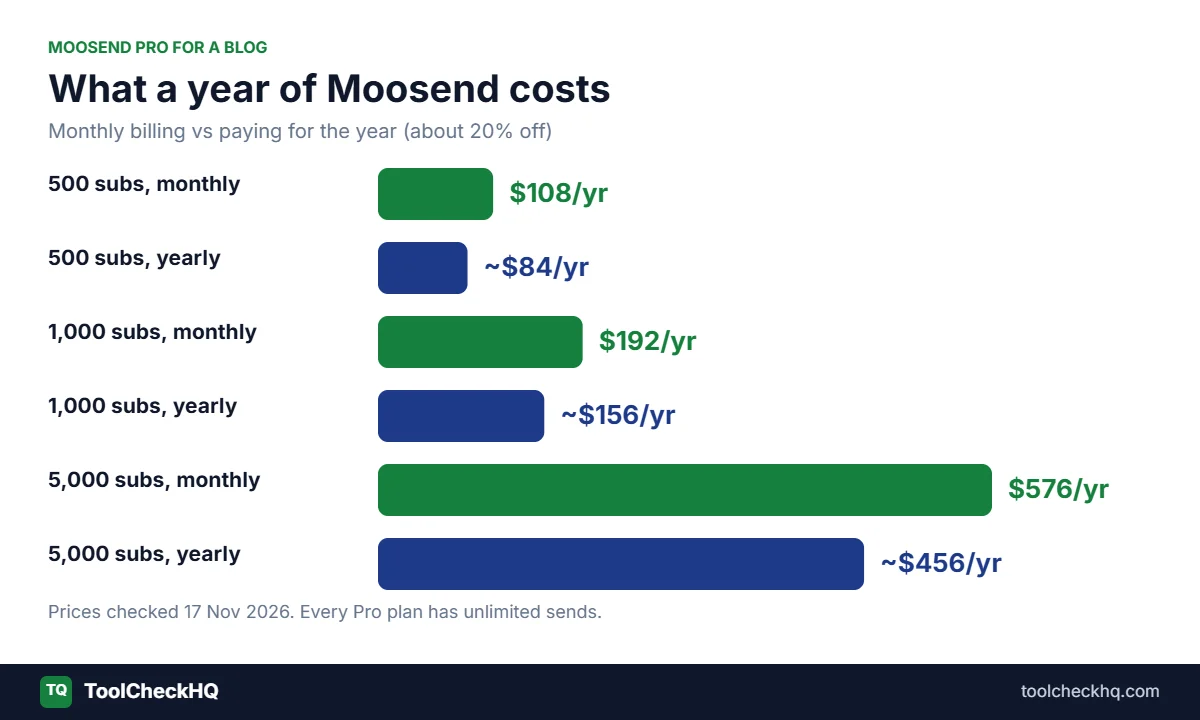
Moosend has one main plan, Pro, and the price depends on how many subscribers you have.
| Subscribers | Pro (monthly) | Pro (billed yearly, per month) |
|---|---|---|
| 500 | $9 | about $7 |
| 1,000 | $16 | about $13 |
| 5,000 | $48 | about $38 |
Every Pro plan includes:
- unlimited emails
- the full automation builder
- landing pages and signup forms
- 5 team members
Paying for 6 months up front saves 15%, and paying yearly saves 20%.
There’s no free-forever plan anymore. You get a 30-day free trial for up to 1,000 contacts, and no card is required. I’d use those 30 days to set up everything in this guide, then decide.
For the full breakdown, see our Moosend pricing guide.
Why unlimited sends matter for bloggers
Bloggers send more email than most small businesses. A weekly newsletter, a welcome series, an email for every new post, and maybe a monthly “best of” roundup. That adds up fast.
Some tools cap your sends. MailerLite’s Comfort plan, for example, limits you to 10 times your subscriber count each month. Moosend Pro doesn’t cap sends, so you can email as often as your readers want without watching a meter.
RSS emails: your posts, sent automatically
This is the feature I’d point most bloggers to first.
Moosend’s RSS campaign pulls content from your blog’s RSS feed and drops it into an email. Every time you publish, it can go out to your list without you building an email by hand.
The email layout fills itself in with the post’s:
- featured image
- title
- short summary
- category
- publish date and link
You can also send it as a digest. Instead of one email per post, Moosend packs your new posts into a daily, weekly or monthly roundup. For most blogs, I think the weekly digest is the better choice. One email a week with 2 or 3 posts feels useful. Five emails a week from a busy blog starts to feel like a lot.
How to find your RSS feed
If you’re on WordPress, your feed is usually your domain plus /feed/. For example, yourblog.com/feed/. Open it in a browser. If you see a page of code with your post titles in it, that’s your feed.
A couple of tips:
- Use featured images on every post, or the email will look empty.
- Write a proper excerpt for each post. The summary in the email often comes from it.
- Send a test to yourself first, and check it on your phone.
Signup forms that work on a blog
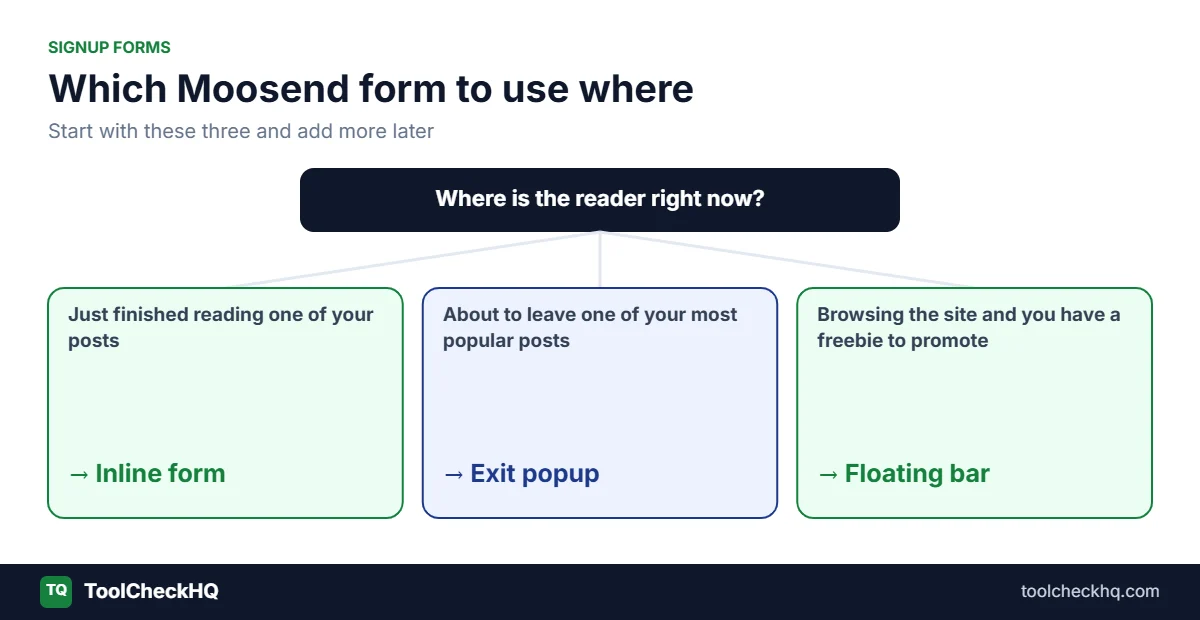
You can’t email people you haven’t collected. Moosend’s form builder covers the main form types:
| Form type | Where it shows | Good for |
|---|---|---|
| Inline form | Inside your post content | Readers who just finished a useful post |
| Popup | Over the page, on a timer or when someone is about to leave | Bigger list growth, with some annoyance |
| Floating bar | Thin bar at the top or bottom of the page | A quiet, always-there reminder |
| Floating box | Small box in a corner | A softer option than a popup |
| Full page | Takes over the whole screen | Big launches, used sparingly |
Moosend says the inline form is the one built with bloggers in mind, and suggests putting it in the middle or near the end of a post. I agree with that. Someone who read 80% of your article is a warm reader.
Here’s the setup I’d start with:
- An inline form at the end of every post.
- An exit-intent popup on your most popular posts only.
- A floating bar if you have a free download to promote.
Keep the form short. Just an email address works for most blogs. Asking for a first name is fine if you’ll actually use it in your emails.
What about the WordPress plugins?
Moosend has two WordPress plugins: one for subscription forms and a “Website Connector” for site tracking. Both look like they haven’t been updated in a long time. Plugin directories flag the forms plugin as possibly abandoned.
So I wouldn’t rely on them. The safer route is to build your form in Moosend and paste the embed code into a Custom HTML block in WordPress, or connect your website in Moosend so it can publish the form for you. Many popular form plugins (Fluent Forms, WS Form and JetFormBuilder, for example) also have Moosend integrations if you already use one of them.
Give people a reason to subscribe
“Subscribe to my newsletter” doesn’t get many signups. A small, useful freebie does much better. This is called a lead magnet.
Ideas that fit most blogs:
- a checklist that matches your most popular post
- a cheat sheet or one-page summary
- a template your readers can copy (a meal plan, a budget sheet, a packing list)
- a mini email course that runs over 5 days
Match the freebie to the post. A reader on your “how to start a vegetable garden” post wants a planting calendar, not your general newsletter.
In Moosend, you can deliver the freebie in the first welcome email. Our guide to building a welcome email sequence in Moosend walks through it step by step.
The 3 automations every blog should have

Moosend comes with ready-made automation “recipes.” You pick one, edit the emails, and turn it on. For a blog, these 3 do most of the work:
1. Welcome series. Sends the moment someone subscribes. Delivers the freebie, says hello, and points them to your best posts. This is the most important email you’ll ever send, because new subscribers are paying the most attention.
2. New post emails (RSS). Sends your latest posts on a schedule. Keeps readers coming back to your site without you lifting a finger.
3. Re-engagement. Finds people who haven’t opened anything in 90 days or so and asks if they still want your emails. The ones who don’t answer, you remove. That keeps your list clean and your bill lower.
You can add more later. These 3 are enough to run a blog newsletter on autopilot.
How a blogger can make money with Moosend
An email list on its own doesn’t pay. What you send to it does. The common ways bloggers earn from email:
- Affiliate links. Recommend tools or products you’ve written about. Our guide on Moosend for affiliate marketing covers how to do this without hurting your sending reputation.
- Sending readers back to your blog. More pageviews means more ad income if you run display ads.
- Your own products. An ebook, a printable, a course. Moosend can send the emails, but you’ll need another tool for the checkout.
- Sponsors. Once your list is a few thousand people, brands may pay to be mentioned in your newsletter.
Moosend has decent reports for this. You can see opens and clicks per email and per link, so you know which posts and recommendations your readers care about.
Where Moosend is weak for bloggers
I’d rather you know these now than after you’ve moved your list.
No free plan. The 30-day trial is all you get. If your blog is brand new and you have 40 subscribers, paying $9 a month can feel like a lot. Kit’s free plan (up to 10,000 subscribers) or MailerLite’s (up to 250) might suit you better at the very start.
No paid newsletter feature. If you want readers to pay for premium emails, Kit or a platform like Substack does that. Moosend doesn’t.
No checkout. Selling your own ebook or course means adding another tool. If that’s your main plan, look at our Moosend vs Systeme.io comparison.
Old WordPress plugins. As I said above, use embed codes instead.
Prices hidden behind a slider. You have to drag the slider on the pricing page to see your number. Not a deal-breaker, just a bit annoying.
Moosend vs other tools for bloggers
| Tool | Free option | Price at 1,000 subscribers | Best for |
|---|---|---|---|
| Moosend | 30-day trial | $16/month | Bloggers who send often |
| MailerLite | Free up to 250 | $19/month (Comfort) | Brand-new blogs |
| Kit | Free up to 10,000 | $33/month (Creator) | Creators who want to grow free first |
| Systeme.io | Free up to 2,000 | $0 | Bloggers selling courses or ebooks |
If you want the full list, we compared 6 Moosend alternatives with real prices.
A simple 30-day setup plan
Here’s how I’d use the free trial so you know by day 30 whether Moosend is worth paying for.
Week 1: the basics
- Add your sending domain and set up SPF, DKIM and DMARC. Moosend gives you the records to copy.
- Import your current subscribers, if you have any. Only people who opted in.
- Create one list for your blog readers.
Week 2: forms and freebie
- Make your lead magnet. Keep it short and useful.
- Build an inline form and add it to the end of your top 10 posts.
- Add an exit-intent popup to your 3 most visited posts.
Week 3: automations
- Set up the welcome series (3 emails is plenty to start).
- Set up the RSS digest for weekly delivery.
Week 4: check the numbers
- How many people signed up?
- What’s the open rate on your welcome email?
- Which links got clicked?
If signups are coming in and the emails are going out without trouble, it’s probably worth the $9 to $16 a month. If not, the trial ends and you’ve lost nothing.
For a click-by-click walkthrough of the app itself, see how to use Moosend.
FAQ
Is Moosend good for bloggers?
Yes, especially if you send often. Unlimited sends, RSS emails and a low starting price suit blogs well. The main downside is that there’s no free plan.
Can Moosend send my new blog posts automatically?
Yes. Its RSS campaign feature pulls new posts from your feed and sends them, either one at a time or as a daily, weekly or monthly digest.
How much does Moosend cost for a small blog?
$9 a month for up to 500 subscribers and $16 a month for 1,000, billed monthly. Paying yearly brings that down to about $7 and $13.
Does Moosend have a WordPress plugin?
It has two, but both look outdated. Embedding the form code in a Custom HTML block is the more reliable option.
Is Moosend better than MailerLite for bloggers?
For bloggers who send a lot, I think so, because Moosend’s sends are unlimited. For brand-new blogs under 250 subscribers, MailerLite’s free plan is hard to beat. Full details in Moosend vs MailerLite.
Can I use affiliate links in Moosend emails?
Many bloggers do. Keep it to people who opted in, and check Moosend’s acceptable use policy before you build a whole strategy on it. More on that in our affiliate marketing guide.
The bottom line
For a blogger with a growing list who wants to send a newsletter every week, Moosend is one of the best-value tools you can pick. RSS emails save you hours, the forms are easy to set up, and unlimited sends mean you never have to count.
If you’re just starting and money is tight, begin on a free plan elsewhere and come back to Moosend once you pass a few hundred subscribers.
Start your free 30-day Moosend trial, or read our full Moosend review first.
Prices checked on 17 November 2026. Moosend shows prices through a slider, so I cross-checked independent breakdowns. Confirm the price at checkout before you pay.

Naresh runs ToolCheckHQ and builds affiliate sites and YouTube channels around marketing software. He reviews tools by digging through pricing pages, plan limits, help docs and user complaints, then explains in plain English what a tool really costs and who it suits.

