
Moosend sells itself as easy and affordable email marketing. That’s a crowded pitch. Half the tools in the category say the same thing.
So here’s a plain Moosend review: what it does well, where it falls short, what it costs, and who should skip it. It’s based on the vendor’s own pages plus what reviewers on sites like GetApp and Capterra say, and I’ve flagged where sources disagree.
Quick disclosure: ToolCheckHQ may earn a commission if you buy through links on this page, at no extra cost to you. Our affiliate disclosure explains how that works.

Moosend review: the quick verdict
Moosend is a good fit for small businesses, bloggers, and online stores that want solid automation at a low starting price. The $9 Pro plan is hard to beat at small list sizes. The costs rise as your list grows, and there’s no permanent free plan anymore.
If you’re comparing tools, I’d shortlist it next to MailerLite and Systeme.io, and I’d decide with the trial.
Want to judge it yourself? Start the free 30-day Moosend trial.
What Moosend is
Moosend is a cloud email marketing platform. You collect subscribers, organize them into lists and segments, and send campaigns or automated emails. Beyond email, it includes landing pages, signup forms, an SMTP server, and integrations for ecommerce and WordPress.
It’s aimed at marketers who want more power than a basic newsletter tool, without enterprise pricing.
Features
Email editor and templates
Moosend has a drag-and-drop editor and a library of templates. Using Moosend email templates, you can start from a layout and swap in your text, images, and buttons. The editor handles the basics well, and it suits people who’d rather not touch HTML.
Features like countdown timers and conditional content (blocks that change depending on subscriber data) are listed among what’s included during the trial, which is useful for sales and launches.

Automation
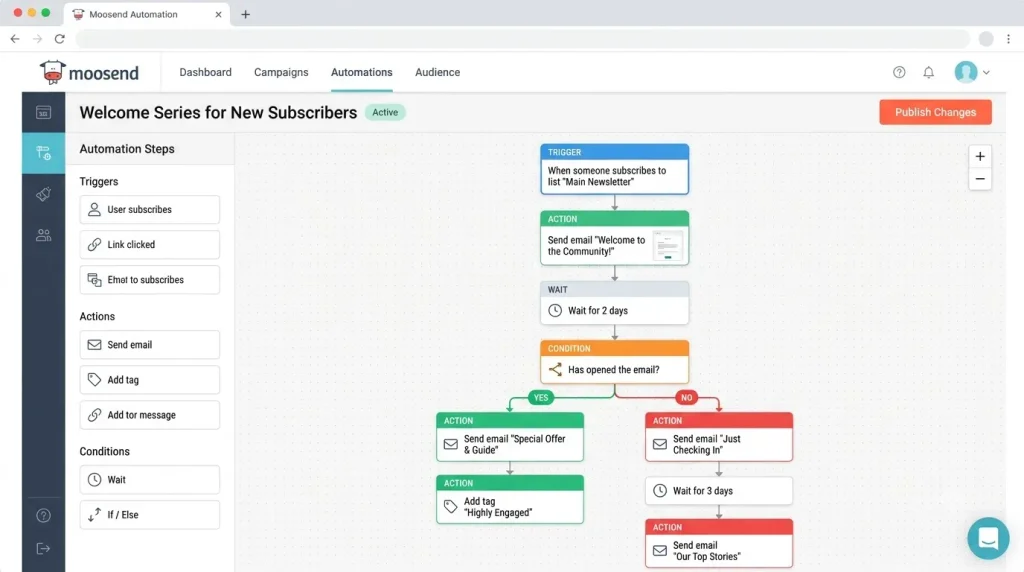
Automation is the headline feature. You build visual workflows: a trigger, then waits, conditions, and actions. Ready-made templates exist for flows such as welcome series and abandoned cart reminders.
Examples of Moosend automation worth setting up early:
- a welcome series for new subscribers (we walk through one in our welcome sequence guide)
- an abandoned cart email for store owners
- a “we miss you” email for subscribers who’ve gone quiet
- a follow-up to people who click a product link
Most reviewers on GetApp praise automation and detailed analytics being available even on lower tiers.
Segmentation
Moosend subscriber segmentation lets you split a list by behavior, like opens, clicks, and purchases. That means a single list can feed several different email streams. It’s one of the easier ways to improve results without writing more emails.
Landing pages and forms
The landing page builder and form builder are both drag and drop. Forms embed on your site, and landing pages can run on their own link or be published inside WordPress through Moosend’s plugin. During the trial, sources describe a limit of 1 landing page and 1 form.

Ecommerce
Moosend connects to WooCommerce, Magento, and other store platforms. Once connected, you can send abandoned cart emails and product recommendation emails. That’s why Moosend for ecommerce comes up so often in comparisons against general newsletter tools.
SMTP and WordPress
Moosend runs an SMTP server you can plug into applications for transactional email. The company’s own guide shows how to connect it to WordPress with a plugin like WP Mail SMTP. If you’re setting up Moosend SMTP, follow their current instructions, since menu names and credentials details can change.
Want to test the automation builder? Try Moosend free for 30 days and open a workflow template.
Ease of use
The dashboard is focused. Because Moosend does email and not funnels or courses, there’s less to learn than in an all-in-one platform. Beginners can usually get to a first campaign within a few hours. Our step-by-step beginner guide lays out the order.
Where beginners get stuck is usually outside the software: sender verification, domain authentication, and building a list the right way.
Deliverability
Deliverability decides whether your emails land in the inbox, and no review can promise a result for your list. What I can say is that Moosend lets you authenticate your domain, and it provides standard tools for list hygiene.
One third-party roundup pointed out that Moosend doesn’t publish exact deliverability figures. That’s not unusual in the industry, but it means you should test with your own audience. The basics matter more than the platform: send only to people who opted in, use a branded sender address, authenticate your domain, and clean your list now and then. If you want to dig into this, the Moosend email deliverability section in our beginner guide covers the setup.

Pricing
Pricing is subscriber-based. Recent sources list a 30-day free trial for up to 1,000 subscribers, then Pro from $9 a month at 500 subscribers. A 2026 breakdown saw about $16 at 1,000 and about $88 at 10,000. Moosend+ and Enterprise are custom quotes, and there’s a pay-as-you-go credit option.
We break down every number, with a cost table, in our Moosend pricing guide.
Check today’s price for your list size: open Moosend’s pricing page.
Moosend pros and cons
Pros
- Low entry price: Pro starts at $9 a month at 500 subscribers
- Automation workflows with ready-made templates
- Behavior-based segmentation
- Landing pages, forms, and an SMTP server in the same account
- Ecommerce integrations with abandoned cart and product recommendation emails
- A 30-day trial that’s long enough to test a real campaign
Cons
- No permanent free plan, according to recent sources
- Costs climb with subscriber count
- Some reviewers report missing advanced features on lower plans
- No phone support during the trial
- Moosend doesn’t publish deliverability numbers
How Moosend compares
- Against MailerLite: MailerLite has a free plan (shrunk in mid-2026) and a website builder. Moosend has the stronger automation reputation at its price. See Moosend vs MailerLite.
- Against Systeme.io: Systeme.io bundles funnels, courses, and checkout. Moosend is email-first. See Moosend vs Systeme.io.
- Against everything else: our list of Moosend alternatives covers 6 tools.
Who Moosend is for
A good match:
- bloggers and newsletter writers (see Moosend for bloggers)
- small online stores on WooCommerce or similar
- affiliate marketers building an email list (see Moosend for affiliate marketing)
- freelancers and small agencies sending for clients
Probably not for you:
- anyone who needs a forever-free plan
- sellers who want checkout and courses in the same tool
- large enterprises that need custom CRM features
What reviewers say
Review sites give a useful read when you take them in bulk. On GetApp, most reviewers describe Moosend as strong value for money, praising the affordable pricing and the amount of functionality on lower tiers. The most common complaints are about features that sit on higher plans, and about the shift away from a generous free plan.
Take review scores with some salt. People who love or hate a tool write more reviews than people who feel fine about it. Read the middle reviews, the ones that explain what the person was trying to do.
Integrations
Moosend lists native integrations for stores and sites, including WordPress, WooCommerce, and Magento, plus connections to form tools, popup tools, and automation platforms such as Make. If your site runs on WordPress, our guide for bloggers covers the 3 ways it connects: embedded forms, landing pages through the plugin, and the SMTP server.
If a tool you rely on isn’t on the native list, an automation platform can usually bridge the gap. That adds another subscription and another thing to maintain, so check the integration list before you commit.
Support
During the trial, sources say there’s no phone support. Higher plans may add more options. If support quality matters to you, ask the team what your plan includes before buying.
A 7-day plan to test Moosend properly
A trial only helps if you use it. Here’s a week-long plan:
- Day 1: create the account, verify your sender, and authenticate your domain.
- Day 2: build a list and import a small test group (or add 10 friends who agreed).
- Day 3: create a signup form or landing page.
- Day 4: build a 3-email welcome workflow, using a template.
- Day 5: send a real campaign to your test group and read the report.
- Day 6: try a segment and an A/B subject test.
- Day 7: price your real list size on the billing slider and compare 1 competitor.
After that week, you’ll know more than any review, including this one, can tell you.
What I’d want to know before buying
A few questions this review can’t answer for you, because they depend on your audience: how Moosend performs for deliverability on your list, whether the editor handles your design needs, and whether you’ll outgrow the features. Those are exactly what the trial is for.
Where Moosend could improve
No tool is perfect, and a few things stand out from the research. The free plan situation is the obvious one: a 30-day trial is generous for testing, but it leaves tiny lists with a clock. Pricing growth is steady with list size, so it’s worth modeling your costs a year out. And since the company doesn’t publish deliverability figures, you’ll rely on your own testing.
None of these are dealbreakers, and each one is easy to check during the trial. If you go in knowing them, you won’t get surprised later.
Frequently asked questions
Is Moosend good?
For small businesses that want automation at a low price, yes. Reviewers on GetApp generally praise the value for money. The weak spots are the lack of a permanent free plan and the cost growth with list size.
Is Moosend legit?
Yes, it’s an established email marketing platform with integrations and a large user base. As with any email tool, results depend on how you build and maintain your list.
Does Moosend have a free plan?
Recent sources describe a 30-day free trial with up to 1,000 subscribers instead of a permanent free plan.
Is Moosend good for beginners?
Yes. The dashboard is focused on email, and templates cover the design side. Sender verification and list building are where beginners need the most care.
What’s the best Moosend alternative?
It depends on your needs. MailerLite is the usual pick for a free plan, and Systeme.io for all-in-one use. See our alternatives list for the rest.
Final verdict
Moosend earns a place on the shortlist for anyone who wants automation and a clean dashboard without a big bill. The $9 starting price is the draw, and the 30-day trial lets you test it properly.
If you want a free plan forever, look elsewhere. If you want email that’s easy to learn and strong on automation, give the trial a go.

Naresh runs ToolCheckHQ and builds affiliate sites and YouTube channels around marketing software. He reviews tools by digging through pricing pages, plan limits, help docs and user complaints, then explains in plain English what a tool really costs and who it suits.