
Disclosure: I earn a commission if you buy through my links, at no extra cost to you. I’ve tried to write this the way I’d explain it to a friend.
Everyone scrolling TikTok at 11pm has the same thought: how hard can it be?
Then they try. Filming, editing, captions, voiceovers, posting at the right hour, every single day. Most people quit inside a month, and honestly, I get why.
TokMax AI is a cloud tool built to remove that grind. You type an idea, it makes a faceless video, and it schedules the post for you. I went through the full sales page line by line, and this article covers what the tool does, what it costs, where the gaps are, and who should skip it.
Check the current TokMax AI price here
What TokMax AI actually is
TokMax AI is a cloud platform made by Dr. Amit Pareek and Atul Pareek. It runs in your browser. Nothing to install, no server to rent, no API keys to paste in.
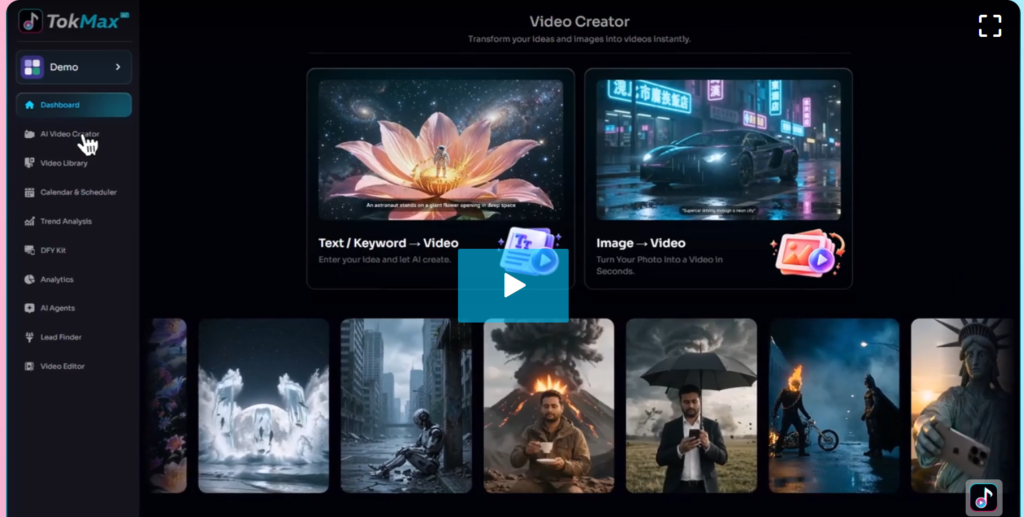
The core job is simple. You give it a topic, keyword, product, image, script or URL. It builds a finished short video with AI visuals, a voiceover, captions and music. Then it posts that video to your TikTok account on a schedule you pick.
Around that core sit the helpers: a trend finder, a script and hook writer, a video editor, a library, a content calendar and analytics.
The page says the videos come from “the world’s top-ranked AI video models.” It doesn’t name them. So I’d judge the tool by the sample videos in the demo, and by what you get on your own topics during the refund window.
How the workflow runs, step by step
Here’s the order the page describes. I’ve put it in plain English.
- Pick a niche. The page lists pets, cooking, faith, travel, facts, motivation and product promos as popular picks.
- Ask the AI assistant for a plan. The example on the page is typing “give me a 30-day plan for my channel” and getting topics, scripts, captions and hashtags back.
- Generate videos from a line of text. Voice, captions and music come built in.
- Touch up in the editor. Trim, split, crop, resize, swap the music or change the captions.
- Schedule in bulk. Pick your videos, pick your times, done. You can also upload 20, 50 or 100 videos you already have and let it post them on schedule.
- Check the analytics. See which videos got views, likes, comments and shares, then make more of the winners.
That’s the whole loop. You swap hours of manual work for a few hours of picking, approving and tweaking.
The features worth knowing about
Not every feature on the list carries the same weight. These are the ones I think matter most.
- Bulk scheduler and content calendar. Load a month of videos in one sitting. The calendar shows what’s upcoming, scheduled, published and failed. That “failed” tab tells me the builders planned for posts breaking, which I like.
- AI video creator. The input list is wide: keyword, topic, product, image, script or URL. A product photo in, a promo video out, according to the page.
- Script and hook generator. The first 3 seconds decide whether a video gets 40 views or 40,000. A tool that writes openers for your niche saves real time.
- Trend and idea finder. It spots top-performing videos in your niche and hands you ideas based on them. Guessing what to post is where a lot of beginners stall.
- Built-in editor and video library. You can finish and store everything in one place instead of juggling 4 apps.
- Analytics. Views, likes, comments, shares and engagement. Basic, but you need it.
- 5,000 free credits. One time only. This one deserves a closer look (see below).
- Cloud hosting and commercial license. Both included.
About those credits
The FAQ says that when your credits run out, you top up inside the dashboard at “member rates.” The page doesn’t say how many credits one video costs. So I can’t tell you whether 5,000 credits gives you 50 videos or 500.
Before you plan a month of content, make a few videos in the first days and watch how fast the credit counter drops. Or email support and ask. It takes 2 minutes and saves you a surprise.
Why most TikTok beginners quit (and what actually helps)
The sales page names 4 reasons beginners give up in the first 30 days. They match what I see in creator communities, so I’ll go through them.
1. Nobody watches. 14 views, then 30 views, then silence. Early videos almost always flop while the algorithm learns who to show you to. The fix is volume plus a sharper hook.
2. You never know what to post. Trends turn over in days. A tool that reads your niche and suggests ideas shortens that guessing game.
3. Reposting other people’s clips goes nowhere. The page says TikTok pushes down recycled clips and that accounts full of them struggle to qualify for monetization. That fits what TikTok has said publicly about original content. Check TikTok’s current creator program rules yourself, since follower and view requirements change.
4. Making video by hand takes forever. Filming, editing apps, captions, voiceovers. Hours for one clip, or $50 to $150 each if you hire an editor (that’s the page’s number, and it’s in the normal range for freelancers).
Consistency is what ties these together. A channel that posts 30 times in a month gives the algorithm 30 chances to find an audience. A channel that posts 4 times gives it 4.
That’s the real pitch of TokMax AI: posting 30 times a month becomes possible for someone with a day job. A weak idea stays weak, so pick your niche carefully.
Is AI content allowed on TikTok?
Yes. The FAQ says AI-created content is allowed and that recycled clips aren’t rewarded. It also says TikTok asks you to label realistic AI-generated videos as AI-made when you post.
Do that. Turn on the AI label every time it applies. It protects your account, and a clean account is the whole asset when you’re building a channel.
Who TokMax AI fits
I’d point to 5 groups.
Affiliate marketers. If you already promote offers, short videos are a traffic source that doesn’t depend on a blog ranking. Post a video, link your offer in the bio. Read TikTok’s rules on bio links and promotional content before you start.
Local business owners. Restaurants, salons, gyms and shops need fresh promo videos and rarely have time to make them. One product photo in, a promo clip out.
Freelancers and side hustlers. The commercial license is included, so you can make videos for clients and keep the money. More on that next.
Coaches, authors and course creators. You know your subject. Daily short videos built from what you already teach grow an audience slowly.
Burned-out creators. Already posting every day and exhausted? Batch a month’s content in one sitting and get your evenings back.
And who should skip it? Anyone wanting guaranteed income (more on that below). Anyone whose brand depends on being on camera. And anyone expecting zero effort, because you still choose topics, review videos and learn what your audience likes.
The commercial license angle
This is the part I find most interesting from a business point of view.
The page says the commercial license is included. You can make videos for local restaurants, salons, shops and other small businesses, sell them at any price, and keep 100% of the money. No attribution, no revenue share.
Freelancers on the page’s own examples charge real money for this work. So here’s the math, and you can run your own numbers. If a local gym pays you a few hundred dollars a month for a batch of short videos, one client covers the cost of the tool. A second client is profit.
The page guarantees nothing about landing those clients, and neither do I. But the service is simple to explain, easy to demo (you can make a sample video for a business before you pitch them), and local owners really do struggle to find time for video.
One of the bonuses (Bonus 6) is a “Local Client Closing Kit” with 25 email and DM scripts, a pricing sheet and a one-page proposal template. If you go this route, I’d start there.
Price, bonuses and the refund policy
Now the numbers. Pay attention here, because the page is a little messy.
Price. The page pitches a one-time payment with no monthly or yearly fees. The P.S. at the bottom lists $37 for the front end and $230 for a “Fast Pass.” The headline pricing blocks show “$197 monthly” with a 75% discount banner, which doesn’t match the $37 figure. The page also says the price rises every few hours during launch. So check the live number at checkout.
Coupon. The page lists the code TOK2 for $2 off.
What “lifetime” means. The page defines it as the lifetime of the product, which it estimates at roughly 5 years. I appreciate that they spelled it out. Plan on 5 years, not forever.
Refund. 30 days, full refund. You raise a ticket on the support desk and give a genuine reason. The page says outright that it’s not a “no questions asked” policy. Fair enough, and I’d rather see that written down than hidden.
Bonuses. There are 6:
- Live training with the founders, taking a new account from zero to a month of posts
- A vault of 1,000 TikTok prompts sorted by niche
- A swipe file of 300 hooks and 100 calls to action
- A 30-day posting calendar for 6 niches
- A monetization playbook covering affiliate links, Creator Rewards, TikTok Shop, brand deals and lead generation
- The local client closing kit
The page puts the bonus value at $1,632 in one spot and $932 in another. Ignore the dollar figures. Judge the bonuses by whether you’d use them. I’d use the prompt vault and the hook file in week one.
See the full TokMax AI offer and bonuses
Things to know before you buy
I’d rather you hear these from me than find them out later.
- No income guarantee. The page’s own disclaimer says results from the owners or anyone else aren’t a promise of your results. The big follower counts on the page (like the 143.9M one) show how huge TikTok is. They say nothing about what you’ll earn.
- Video quality varies. AI video can be hit or miss. Test your niche in the first few days.
- Credits are finite. Covered above. Find the per-video cost early.
- Platform rules change. TikTok updates its policies on AI content and monetization often. Stay current.
- It’s sold through JVZoo. JVZoo is the retailer. Refund requests go through the product’s support desk.
Frequently asked questions
Do I need to show my face? No. Every video is faceless, with AI visuals, voiceover, captions and music.
Do I need followers or an existing TikTok account? No. You can connect a new account or an old one.
Can TokMax AI post for me? Yes. Once your account is connected, it publishes your videos at the times you set.
Can I upload my own videos? Yes. Add them to your library and schedule them next to the AI-made ones.
Can I sell the videos I make? Yes, the commercial license is included and the page says you keep every dollar.
Is there a monthly fee? The page says no. It’s a one-time payment, though you may buy extra credits later.
What if it doesn’t work for me? You have 30 days to ask for a refund through the support desk, with a genuine reason.
My verdict
I think TokMax AI makes the most sense for one kind of person: someone who already knows posting daily is what’s missing, and wants to test faceless TikTok without buying a camera, an editing app and a scheduler.
If the live price matches the $37 on the page, the downside is small. You have 30 days to make real videos, schedule a real month and decide. The upside depends on your niche, your consistency and how well you pitch, and no one can promise that part.
If you’re curious, test it the smart way. Pick one niche. Make 10 videos in your first week. Watch how many credits they use. Post for 30 days. Then decide.
Try TokMax AI with the 30-day refund window
Use coupon code TOK2 at checkout for $2 off, if it’s still active.