
Disclosure: I earn a commission if you sign up through links here, at no extra cost to you. Prices come from Pose AI’s public pages as of November 2026. They change, so confirm on the checkout screen.
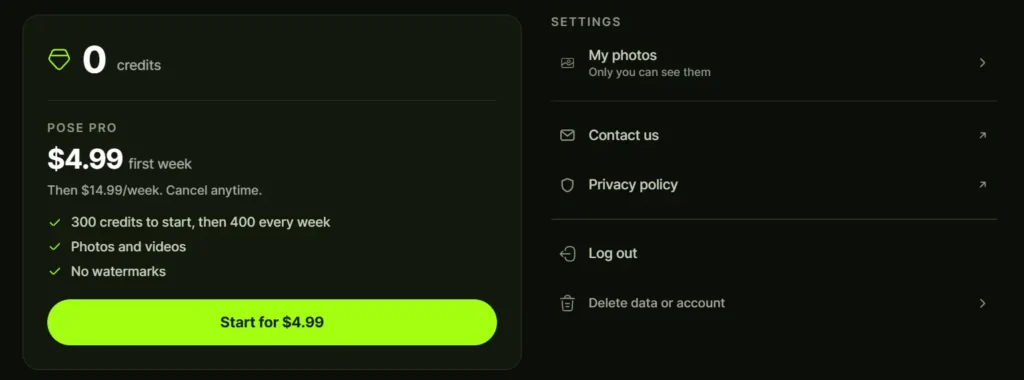
Pose AI costs $4.99 for your first week, then $14.99 per week. The first week includes 300 credits. After that you get 400 credits every week.
That’s the whole price list. There’s one plan, no free tier and no annual discount that I could find.
Weekly pricing hides the real number, so $14.99 looks smaller than it is. This page shows what you’ll pay over 4 weeks, 8 weeks and a year, plus how the credits work and how to cancel.
If you want the full product tour first, start with my Pose AI review.
Want to test it yourself? Try Pose AI for $4.99
Pose AI pricing at a glance
| First week | Week 2 onward | |
|---|---|---|
| Price | $4.99 | $14.99 per week |
| Credits | 300 | 400 per week |
| Cost per credit | about 1.7 cents | about 3.7 cents |
| Watermarks | None | None |
| Cancel | Anytime | Anytime |
Source: the company’s pricing and homepage. All plan features are unlocked, including photos, headshots, couple photos, upscaling and video.
How much does Pose AI cost per month?
Pose bills weekly, so there’s no true monthly price. You can still work one out.
- First 4 weeks: $4.99 + (3 x $14.99) = $49.96
- First 8 weeks: $4.99 + (7 x $14.99) = $109.92
- Monthly equivalent after week 1: about $65
- One full year, never cancelling: about $769
A full year of Pose AI costs more than a decent laptop bag. Few people will stay on for 12 months, and that’s fine. The numbers show why the weekly plan suits short bursts of use.
Want to check today’s price on the checkout screen? Open Pose AI here.
Is Pose AI free?
No. The app is free to download, and the website lets you look around. Generating photos or video needs a paid plan.
The company’s FAQ says it plainly: free to download, paid subscription to use, all features unlocked once you pay.
Does Pose AI have a free trial?
There’s no free trial. There’s a discounted first week for $4.99.
That’s the closest thing to a trial, and it comes with real credits (300). You can make a decent handful of headshots, run a few clips and judge the likeness before the $14.99 renewal hits.
Some app listings and third-party sites claim a “free tier with limited access” for Pose-type apps. Those usually describe a different product with a similar name. More on that below.
What do Pose AI credits cover?
Credits pay for everything: photos, headshots, couple photos, upscaling and video. One pool, no separate video wallet.
The part that trips people up is cost per generation. The model you pick changes how many credits a job uses. Shotkit’s review makes this point, and the homepage labels the video engines as Kling 3.0, Veo 3.1, Sora 2 and Wan 2.6 (the last tagged “value”), which hints that the price tiers differ.
I couldn’t find a published table of credits per job. So I can’t tell you that 400 credits equals 40 photos or 4 videos. Check the credit cost on screen before each run, and test one generation per model in week 1.
Do credits roll over? The company describes them as refreshing every week. I found no rollover rule, so assume unused credits don’t carry over until you confirm in the terms.
Is Pose AI worth $14.99 a week?
It depends on what you make.
Worth it if you produce content regularly. A creator who needs 20 fresh images and 3 or 4 short clips each week gets decent value from one pool of credits. You skip stacking a headshot app, a video tool and an avatar app.
Hard to justify if you need one profile picture. One-time headshot packs from HeadshotPro and Aragon run around $25 to $29, according to Pose’s own pricing guide. One week of Pose plus a second week costs $19.98, and you’ll likely spend more than that.
A simple rule: if your project fits inside the first week, Pose AI is cheap. If it needs 3 weeks or more, compare it against monthly tools.
Pose AI vs other tools on price
Pose AI published a pricing guide in August 2026. A vendor compiled it, so treat the competitor figures as approximate.
| Tool | Price | Model |
|---|---|---|
| Pose AI | $4.99 first week, then $14.99/week | Weekly credits |
| HeadshotPro | about $25 to $29 | One-time pack |
| Aragon | about $29 | One-time pack |
| Secta | about $49 (not published on its site) | One-time, per reviews |
| PhotoAI | from $19/month, up to $199/month | Monthly subscription |
| Captions | $9.99 to $69.99+/month | Video and UGC tools |
| Arcads | $110 to $550/month | UGC ad actors |
Captions and Arcads are video and UGC tools. They sit in the table because creators compare them with Pose’s video features.
Want the detailed matchups? Read Pose AI vs competitors. For other tools worth a look, see Pose AI alternatives.
Where weekly pricing loses to monthly tools
PhotoAI starts at $19 a month, per Pose’s own guide. Over 4 weeks, Pose costs $49.96. That’s $30 more for the same 30 days.
So why pick Pose? Video, mainly. PhotoAI is built around a trained model of your face and photo output. Pose adds native video engines and a one-selfie start. If you never touch video, the monthly tool probably wins on cost.
Where Pose wins is speed to first result. You upload a selfie and generate in minutes, with no training wait. For a short project, that matters more than the monthly rate.
Watch out for similar names
Search “Pose AI price” and you’ll land on several products:
- Pose AI (pose.ai): the one covered here, $4.99 then $14.99 a week
- aipose.io: a pose generator with monthly plans listed from $9.99 up to $79.99
- PoseUp (poseup.ai): $16 and $32 a month, plus credit packs
- A Polaroid photo app: weekly and monthly subscriptions in the $10 to $30 range on the App Store
These are separate companies. If the checkout page doesn’t say pose.ai or Pose AI LLC, you’re somewhere else.
How to cancel Pose AI
The company says you can cancel anytime. The way you cancel depends on where you paid.
Subscribed in the iPhone app. Open your Apple ID subscriptions in Settings, find Pose AI and cancel there. Deleting the app does nothing to billing.
Subscribed on the web. Use your account settings on the Pose website, or contact support at pose.ai/support if you can’t find the button.
Cancel at least a day before renewal. With weekly billing, the renewal date sneaks up fast. I’d set a reminder for day 6 of the first week.
On refunds: I couldn’t verify a refund policy, so read the terms before paying. For iPhone purchases, refund requests usually go through Apple.
What 4 real scenarios cost
Numbers beat opinions here, so I ran 4 situations through the current prices.
1. One set of headshots. You use the first week, grab your best 10 images and cancel before renewal. Total: $4.99. A one-time headshot pack runs about $25 to $29, so this is the cheapest way to get a profile photo, if the likeness works for you.
2. A month of content. You’re a creator posting daily. Four weeks cost $49.96, which averages about $12.49 a week. Credits are the limit, so plan your output.
3. A 3 month client project. You make UGC-style clips and product photos for a small business. That’s 13 weeks: $4.99 + (12 x $14.99) = $184.87. You’d need to bill clients more than that to break even, and your time isn’t in the number.
4. Seasonal photos. Christmas cards, holiday profile pictures, a New Year’s post. Run it for the 4 weeks of December and you’re at $49.96 again. Then cancel on January 1.
Hidden costs to watch
Weekly plans cost money in small ways.
- Forgotten renewals. One missed cancellation is $14.99. Two is $29.98.
- Running dry mid-week. Shotkit’s review mentions the option to buy extra credits as you go. I couldn’t confirm the current price, so check inside the app before you rely on it.
- Paying while you decide. Every week you spend thinking about it is $14.99. Make the call on day 6.
- Wasted rerolls. A weak selfie costs credits. A sharp one doesn’t.
None of this is unusual for AI apps. It’s just easier to ignore when the price looks small.
Taxes and currency for US, UK, Canada and Australia
Prices are listed in US dollars. If you’re in the UK, Canada or Australia, your card or Apple account converts the amount, and local taxes may be added at checkout. The final figure on the checkout screen is the one that counts.
How to get the most from your credits
Credits are the real currency here, so a few habits pay off.
- Test photos before video. If the likeness is off in a still, a video built from it will be worse. Fix the still first.
- Use the cheaper video engine for drafts. The homepage tags Wan 2.6 as the value option. Save the premium engines for the clips you plan to post.
- Start with a good selfie. A sharp, front-facing photo in good light cuts rerolls. The company says about 1 in 10 generations needs a retry, and a bad input photo pushes that number up.
- Write one clear prompt. Scene, outfit, lighting. Skip describing your face. My guide on how to use Pose AI has copy-ready prompt templates.
- Batch your work. Plan the week’s images first, then generate. Random experimenting burns credits.
Pose AI pricing FAQ
How much does Pose AI cost?
$4.99 for the first week, then $14.99 per week.
How many credits do I get?
300 in the first week and 400 every week after.
Is there an annual plan?
I couldn’t find one. The pricing page shows a single weekly plan.
Can I use Pose AI for free?
No. You need a paid plan to generate anything.
Does Pose AI add watermarks?
The company says no watermarks on any plan.
Is Pose AI cheaper than HeadshotPro?
For a single headshot set, no. HeadshotPro’s one-time pack is around $25 to $29. For headshots plus video over a short stretch, Pose can work out cheaper than buying 2 separate tools.
Can I earn money by recommending Pose AI?
Yes. The affiliate program pays 25% of every payment from your referrals for the lifetime of their account, with Stripe payouts at $50. At current prices that’s about $1.25 on the first week and $3.75 on each later week. Details are on the official affiliate page and in my Pose AI review.
My take on the price
Pose AI is priced for sprints. The $4.99 opener is a low-risk way to test, and the $14.99 weekly renewal is high enough that you should have a plan before day 7.
If you’ll make headshots, a few travel photos and a couple of videos, the first week is a bargain. If you want to keep playing for months, do the math above first.
Try Pose AI for $4.99
Not sure it fits? Check Pose AI alternatives before you pay.