Disclosure: ToolCheckHQ may earn a commission if you buy through links on this page. It costs you nothing extra. Read our affiliate disclosure.
An AI meeting assistant joins your call, records it, and hands you a transcript, a summary and a list of tasks. The good ones save an hour of typing after every meeting.
The market is crowded now, and the tools differ more than their websites suggest. Some give away a lot for free. Some cost little. A few build client documents from your calls.
This guide covers eight AI meeting assistants that work with Zoom, Google Meet and Microsoft Teams. For each one you get the price, who it fits best, and what to watch out for.
I built it from vendor pages and third-party pricing trackers dated from May to November 2026. I did not test every tool myself, so confirm prices on each vendor’s site before you buy.
The best AI meeting assistants at a glance
- Best for client deliverables: Sembly AI
- Best free plan: Fathom
- Best all-rounder: Fireflies
- Lowest-cost transcripts: Otter
- Best for spotting trends across meetings: tl;dv
- Best bot-free option: Granola
- Best for noisy rooms and audio quality: Krisp
- Best for meeting quality scores: Read AI
How I picked these tools
I looked for tools that work with the three platforms most people use: Zoom, Google Meet and Microsoft Teams. I then compared price, free plan, team features and the type of user each tool serves best.
I left out tools with no public pricing and tools aimed only at large enterprises. Every tool here has a free plan or a free trial, so you can test it before paying.
Comparison table
| Tool | Free plan | Paid from (per user a month) | Best for |
|---|---|---|---|
| Sembly AI | Yes, 5 meeting hours | $10 billed yearly | Client documents |
| Fireflies | Yes, 400 minutes of storage per team | $10 billed yearly | All-round use |
| Fathom | Yes, unlimited recordings | $16 billed yearly | Free plan, sales teams |
| Otter | Yes, 300 minutes a month | $8.33 billed yearly | Low-cost transcripts |
| tl;dv | Yes, unlimited recording | $18 | Trends across meetings |
| Read AI | Yes, 5 meetings a month | $19.75 | Meeting quality scores |
| Granola | Yes, 14-day history | $14 | Bot-free notes |
| Krisp | Yes, limited minutes | $8 | Noise cancellation |
Prices for tl;dv, Read AI, Granola and Krisp come from a May 2026 comparison, and the billing period was not stated. The first four rows use yearly billing.

1. Sembly AI
Best for: consultants, agencies and freelancers who send proposals, reports or decks after client calls.
Sembly joins Zoom, Google Meet, Microsoft Teams and Webex, then writes notes, finds tasks and answers questions across your meeting library. Its standout feature is the document work. You can set up a client, add their branding, and generate proposals, pitch decks, reports and similar files from your meetings.
Price: Free plan with 5 meeting hours. Paid plans cost $10 (Basic), $20 per user (Pro) and $30 per user (MAX) a month billed yearly. MAX needs at least 3 users.
What I like: Unlimited meeting hours on paid plans, 45+ languages and branded client files in .pptx and .docx formats.
Watch out for: The price is higher than most rivals at the team level, and monthly Studio credits limit how much AI document work you can generate.
Sembly’s Black Friday code, BF2026, takes 20% off any plan for 12 months through November 30, 2026.
For a closer look, read my Sembly AI review and my Sembly AI pricing guide.
2. Fireflies
Best for: teams that want one tool for notes, search and analytics at a mid-range price.
Fireflies is among the most widely used note takers. Pro includes unlimited AI summaries, video recording and integrations. Business adds conversation intelligence and team analytics.
Price: Free plan. Pro is $10 and Business is $19 per user a month billed yearly. Enterprise is $39 and includes SSO, audit logs and HIPAA.
What I like: Strong value at the Pro level and plenty of integrations.
Watch out for: AI credits are shared across the workspace, so adding seats does not add credits. Trackers also disagree on how credits refresh.
3. Fathom
Best for: individuals who want a strong free plan, and sales teams that need CRM sync.
Fathom records Zoom, Google Meet and Microsoft Teams meetings with unlimited storage and instant AI summaries. Its Business plan adds CRM field sync with Salesforce and HubSpot, coaching metrics and AI scorecards.
Price: Free. Premium is $16, Team is $15 (2-seat minimum) and Business is $25 per user a month billed yearly.
What I like: The free plan is hard to beat.
Watch out for: Some reviews report a cap on advanced summaries on the free plan. Fathom’s own page describes none, so check the current wording.
4. Otter
Best for: students, writers and individuals who mainly want live transcripts at a low price.
Otter focuses on transcription, search and chat with your transcripts. It is one of the older names in the space.
Price: Free plan with 300 minutes a month and 30 minutes per conversation. Pro is $8.33 and Business is $19.99 per user a month billed yearly.
What I like: The lowest paid price in this list.
Watch out for: The free plan stops at its monthly minutes and allows only 3 file imports over the life of the account.
5. tl;dv
Best for: managers and product teams who want to spot trends across many meetings.
tl;dv offers unlimited recording on Zoom, Google Meet and Microsoft Teams on its free plan. It is built around searching and summarizing across meetings.
Price: Free, with recordings that auto-delete after 3 months. Paid plans start around $18 per user a month.
What I like: Unlimited free recording, and a focus on patterns across calls.
Watch out for: Free recordings disappear after 3 months, and paid plans cost more than average.
6. Read AI
Best for: organizations that want to measure and improve how their meetings run.
Read AI scores meetings, so you can see engagement and patterns over time. It suits teams that care about meeting quality as much as notes.
Price: Free plan with 5 meetings a month. Paid plans start around $19.75 per user a month.
What I like: The meeting analytics go beyond a simple summary.
Watch out for: The free allowance is small and the starting price is higher than most rivals.
7. Granola
Best for: consultants, lawyers and client-facing people who dislike a bot joining their call.
Granola captures audio on your computer, so no bot appears in the meeting. That works on any platform, since it listens to your system audio.
Price: Free with 14 days of history. Paid plans start around $14 per user a month.
What I like: Clients never see a recording bot.
Watch out for: It runs on macOS only, has limited CRM integrations and supports about 10 languages.
8. Krisp
Best for: remote workers in noisy places who care about audio quality.
Krisp cleans background noise and also writes private meeting notes. It works with any meeting platform and with phone calls through a local install.
Price: Free with limited transcription minutes. Paid plans start around $8 per user a month.
What I like: Great for people who take calls from busy homes or cafes.
Watch out for: The free transcription is limited, and most integrations run through Zapier.
Honorable mentions
- Avoma: Built for sales teams that want coaching analytics. It has no free tier, only a 14-day trial, and starts around $19 per seat.
- Fellow: Focused on structured meeting workflows. The free plan includes 5 AI recordings per user, and paid plans start around $7.
Which AI meeting assistant should you choose?
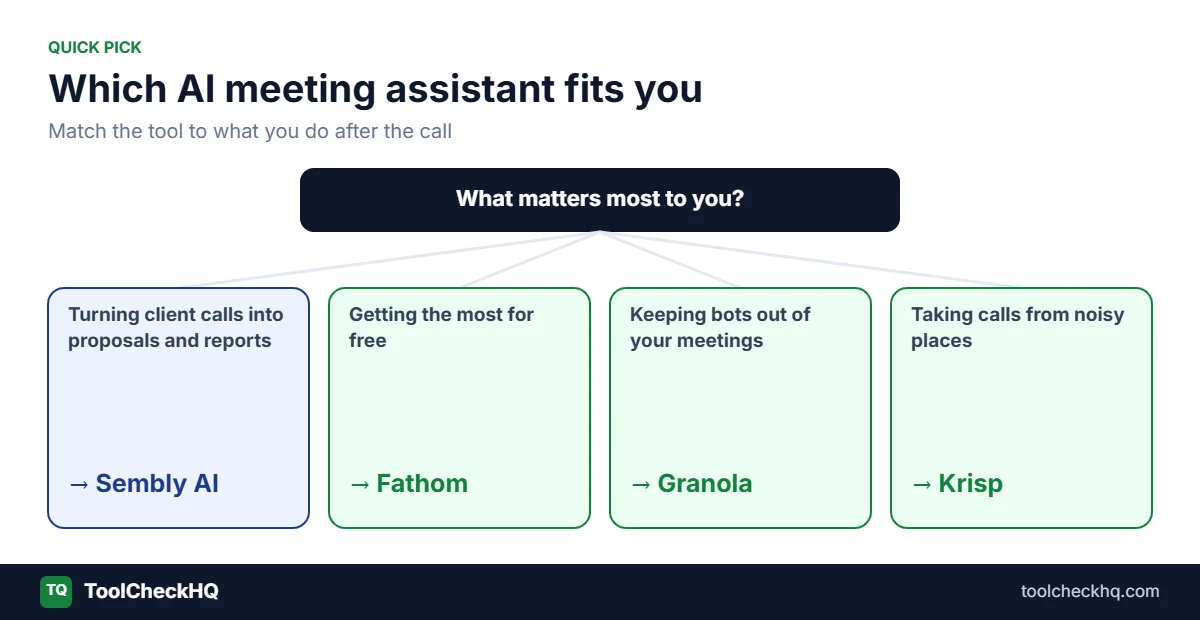
You write client proposals and reports after calls: Sembly AI.
You want the best free plan: Fathom.
You want a balanced tool at a fair price: Fireflies.
You want the cheapest paid plan: Otter.
You run a sales team: Fathom Business or Avoma.
You do not want a bot in your meetings: Granola.
You work in noisy places: Krisp.
You want to measure meeting quality: Read AI.
How to get the most from any AI meeting assistant
- Tell people the call is recorded. Many places require consent, and it is good practice everywhere.
- Start with the free plan. Run the same real meeting through two tools and compare the notes.
- Check accuracy with your own accents and jargon. Transcripts vary by speaker.
- Read the privacy settings. Look at how long recordings are kept and whether your data trains models.
- Count your real usage before paying yearly. Choose monthly billing first if you are unsure.
Final verdict
There is no single best AI meeting assistant. The right pick depends on what happens after your calls.
If the answer is client documents, Sembly AI is the one built for it. If the answer is notes, Fathom, Fireflies and Otter cover most needs at a lower price. Granola and Krisp fit people who want a quieter setup.
My advice is to test two tools on real meetings before you pay for either. Then keep the one you open every day.
AI meeting assistant FAQ
What is the best AI meeting assistant in 2026?
It depends on your use. Sembly AI is the best fit for client deliverables, Fathom for free use, Fireflies for all-round value and Otter for low cost.
What is the best free AI meeting assistant?
Fathom offers unlimited recordings and storage on its free plan. tl;dv also offers unlimited recording, but auto-deletes free recordings after 3 months.
Which AI meeting assistants work with Zoom, Google Meet and Microsoft Teams?
All eight tools in this guide work with the three main platforms in some form. Sembly also supports Webex. Granola and Krisp capture audio from your computer, so they work with any platform.
Do AI meeting assistants join as a bot?
Most do. Granola avoids a bot by capturing your computer’s audio. Sembly can also record in-person meetings through its mobile app or an uploaded recording.
Are AI meeting assistants safe for private meetings?
Many list SOC 2 or GDPR compliance, but policies differ. Read each vendor’s privacy page, check how your data is used for training, and get consent from participants.
Which AI meeting assistant is best for consultants and agencies?
Sembly AI, because it builds branded proposals, reports and decks from your meetings. Granola suits consultants who want no visible bot.
Last updated: November 18, 2026. Pricing and features change often, so confirm them on each vendor’s website before you buy.

Naresh runs ToolCheckHQ and builds affiliate sites and YouTube channels around marketing software. He reviews tools by digging through pricing pages, plan limits, help docs and user complaints, then explains in plain English what a tool really costs and who it suits.