

Disclosure: I earn a commission if you buy through links on this page. It costs you nothing extra. Everything below comes from Pose AI’s own pages, app store listings and outside reviews, and I say so whenever I’m repeating a company claim.
Pose AI takes one selfie and turns it into new photos and short videos of you. Headshots, beach shots, dating profile pictures, a clip of your AI self walking through Paris.
That’s the pitch. I went through the pricing page, the affiliate terms, the app store listings, the company FAQ and a few outside reviews to see how much of it holds up.
Short version: it’s a solid all-in-one studio if you’ll use both photos and video. If you only want one LinkedIn headshot, a one-time pack costs less. Details below.
Pose AI review at a glance
- Best for: creators, freelancers and anyone who wants photos and video from the same face
- Price: $4.99 for the first week (300 credits), then $14.99 per week (400 credits)
- Free plan: none
- Watermarks: none, according to the company
- Platforms: iPhone app, Android listing and a web app
- Biggest win: one subscription covers photos, headshots and video
- Biggest catch: weekly billing works out to roughly $65 a month
What is Pose AI?
Pose AI (pose.ai, made by Pose AI LLC) is an AI photo and video studio. You upload one clear selfie. An identity-locked model called Nano Banana 2 then generates new pictures that look like you. There’s no training step, and you don’t upload 25 photos and wait a few hours.
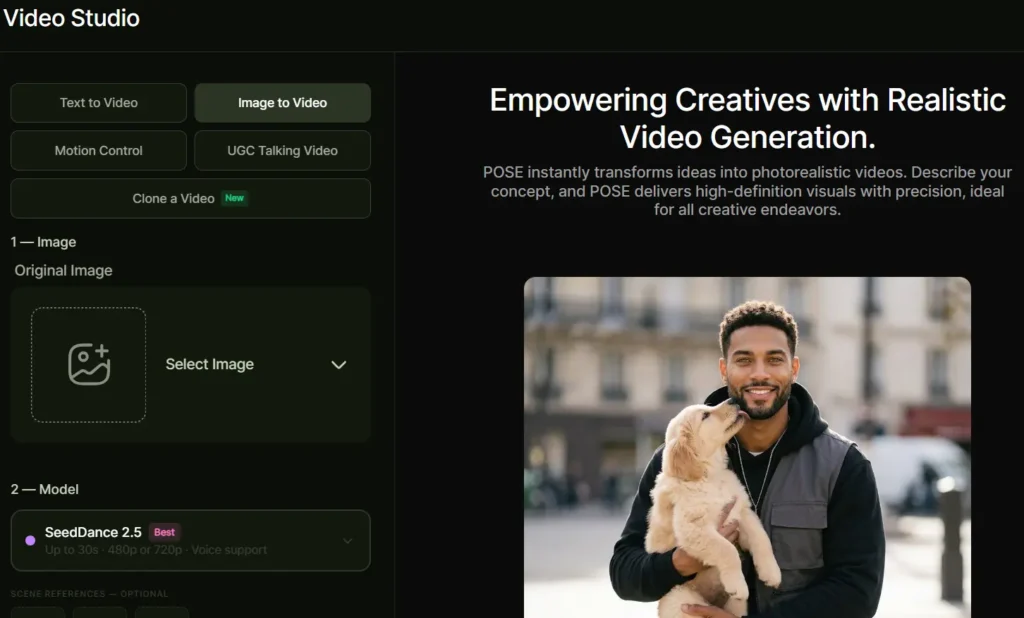
Video runs on third-party engines. The site lists Kling, SeedDance, Wan, Veo, Sora 2 and HeyGen, and you choose which one to use.
A quick warning on names. A Polaroid photo app, a pose generator at aipose.io and PoseUp all have near identical names, and their prices differ. This review covers pose.ai only. If you see $9.99 or $16 a month somewhere, you’re probably looking at a different product.
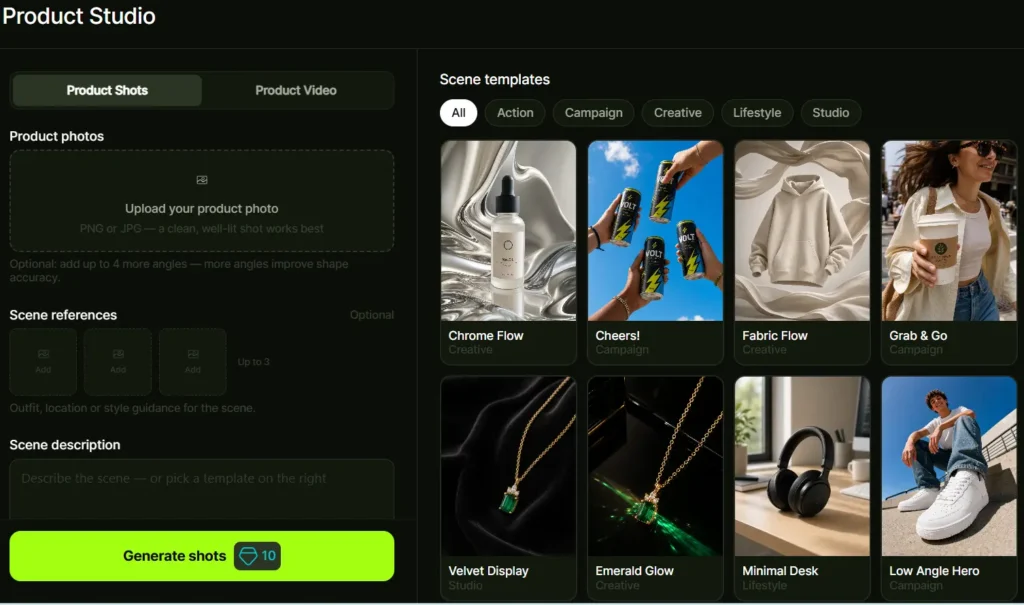
What you actually get inside Pose AI
Image Studio and style packs
Image Studio is where most people start. You pick from 200+ styles or write your own prompt in plain language. The homepage sorts them into 118 collections: LinkedIn headshots, Tinder and Hinge photos, travel shots in Bali or Santorini, 1920s portraits, cyberpunk, Christmas and plenty more.
There’s also Clone a Look. You upload a photo you like and Pose tries to rebuild it with you in it.
The Quick Edit tool redraws a photo already in your gallery in a new pose: Standing, Sitting, Jumping, Walking or Dancing. The company calls it an AI redraw, so expect a fresh image that resembles the original.
Headshots
The headshot styles cover business casual, CEO portraits, real estate agent, doctor and actor looks. The company says output goes up to 4K.
For someone who needs a profile photo this week and has no photographer, this is the easiest part of the product to judge. You’ll know within 10 minutes whether the face looks like yours.
Video Studio
Video Studio does text-to-video, image-to-video, Motion Control, Clone a Video and UGC talking videos. A UGC talking video is a person speaking to camera, the format you see in social ads.
The homepage labels the engines: Kling 3.0 as new, Veo 3.1 as pro, Sora 2 as stable and Wan 2.6 as value. The engine you pick changes the credit cost, and Shotkit’s review makes the same point about spending credits.
Couple photos, product photos and posters
Pose has a couple photo generator with 50+ templates (beach sunset, Paris, wedding, anniversary). You upload one selfie of each partner. The company says it takes about 2 minutes, longer for complex scenes.
Product photos and posters get generated inside the app too, which matters if you sell on Etsy or run a small store.
How good are the results?
I haven’t run 1,000 generations through Pose AI, so I can’t give you a hit rate. What I can do is tell you what the company claims and what outsiders report.
The company says about 1 in 10 generations needs a regenerate to fix small hand or background glitches. That’s a more honest claim than “perfect every time,” and it matches what I’d expect from any image model in 2026.
Speed claims are messy. One part of the site says headshots take under 10 seconds. The FAQ says most photos take about 2 minutes and complex scenes 3 to 4. Plan around the slower number.
Outside the company, Shotkit walked through Image Studio and recommends a straight-on selfie with your full face in view. App Store reviewers call the photos realistic. The testimonials on the homepage are picked by the company, so I’d give them less weight.
Across AI headshot apps in general, the loudest complaints are likeness misses and paying again for rerolls. I’d expect Pose users to hit the same wall now and then.
What improves your odds:
- A sharp, front-facing selfie in good light
- No sunglasses and no heavy filters
- 3 to 5 selfies per person for couple photos
- Prompts that describe the scene and outfit, never your face
The full walkthrough is in my guide on how to use Pose AI.
What I’d test in the first week
The $4.99 week has a clock on it, so don’t waste credits on random experiments. Here’s the order I’d run things in.
Day 1: upload your best selfie and generate 4 headshots. If none look like you, switch selfies before spending more credits. Day 2: try one travel style and one dating style to see how well the face holds up in full-body shots. Day 3: turn your favorite still into a short clip with the cheaper video engine. Day 4: try the Quick Edit poses on a photo you already like.
By day 5 you’ll know whether the likeness works for you. Use days 6 and 7 to download everything you want, then decide about renewal.
Pose AI pricing in short
There’s one plan. The first week costs $4.99 and includes 300 credits. After that it renews at $14.99 per week with 400 credits. No free tier, no watermarks, cancel anytime.
Do the math and $14.99 a week is about $65 a month, or about $779 a year if you never cancel. That’s the number to keep in your head. My full breakdown, with credit math and cancel steps, is in Pose AI pricing explained.
Pros and cons
Pros
- One subscription covers photos, headshots and video
- One selfie is enough to start
- 200+ styles, so you rarely stare at a blank prompt box
- iPhone app plus a web app
- No watermarks
- The first week is cheap enough to test properly
Cons
- No free tier at all
- Weekly billing costs more over time than monthly tools
- Credit cost changes by model, so 400 credits can disappear fast on video
- You’re uploading your face, so privacy deserves a read
- Most quality claims come from the company itself
Is Pose AI legit?
Yes, it’s real. There’s a company behind it (Pose AI LLC), an App Store listing, a Google Play listing, a web app, a privacy policy, terms and a data deletion page.
Whether it’s worth the money depends on how you use it. Subscription photo apps pick up complaints over weekly auto-renewal. Pose says plainly that it renews at $14.99 a week after the first week unless you cancel. Set a phone reminder for day 6.
Read the privacy policy and data deletion page before you upload your face. That goes for any AI photo tool.
Who should use Pose AI
Creators and influencers. You need a steady stream of fresh images and short clips. A single plan that handles both saves you juggling 2 or 3 apps.
Freelancers. If you make UGC-style videos, product shots or profile photos for clients, the credits work like a small production budget. Check the terms on commercial use first.
People refreshing dating or LinkedIn photos. The first week at $4.99 is enough to try it, grab your best shots and cancel.
Who should skip it
Anyone who wants one headshot and nothing else. One-time packs from HeadshotPro or Aragon run around $25 to $29, per Pose’s own pricing guide. Those cost less than a month of Pose.
Anyone who needs a free plan. There isn’t one.
Big teams. The company says it suits teams, but I haven’t seen a real team rollout reviewed. Test with 2 people before committing a department.
Pose AI vs alternatives
Pose competes with headshot packs on price, with PhotoAI on features and with video tools on UGC. I compare them one by one in Pose AI vs competitors, and I list 8 other options in Pose AI alternatives.
My rough take: Pose wins when you want photos and video in one place. A one-time pack wins when you want a single set of headshots.
Can you make money with Pose AI?
Two routes, and both take real work.
Route 1: use it for paid projects. Local businesses, coaches and real estate agents need profile photos, short promo clips and product images. Pose can produce those fast. Whether clients pay you enough to cover $14.99 a week comes down to your sales skills.
Route 2: the affiliate program. Pose pays 25% of every payment from people you refer, for the lifetime of their account. That includes subscriptions and one-time purchases. There’s no cap, and payouts go through Stripe once you reach $50.
Here’s the math at current prices. One referral pays $4.99 in week 1, so you earn about $1.25. Each later week is $14.99, so you earn about $3.75. If that person stays 8 weeks, you collect roughly $27.
That’s my arithmetic from the published terms, not a promise of income. Terms can change, so check the affiliate page before you build a plan on it.
Pose AI review FAQ
Is Pose AI free?
The app is free to download. Generating photos or video needs a paid plan, and the first week costs $4.99.
Is Pose AI worth it?
If you’ll use both photos and video during the week, yes, the first week is easy to justify. If you only need 1 headshot, a one-time pack is cheaper.
Does Pose AI look like me?
It reads your face from your selfie, and the company says it keeps your identity across styles. Results depend on your input photo, and the company admits some outputs need a retry.
Can I cancel Pose AI anytime?
The company says yes. If you subscribed on iPhone, cancel through your Apple subscription settings. If you subscribed on the web, use your account settings.
Is there a Pose AI app for Android?
There’s a Google Play listing, and the web app runs in a phone browser.
Does Pose AI have a free trial?
There’s a discounted first week for $4.99. It costs money, though a lot less than the regular price.
Final verdict
I’d give Pose AI 7.5 out of 10 on features and price, and that score can move once you’ve run your own test. The photo and video combo is the draw. The weekly bill is the drawback.
Try it for the $4.99 week. Make your headshots, run 2 or 3 video clips, and decide on day 6 whether the second week is worth $14.99.
Start with Pose AI here
Before you pay, read the full Pose AI pricing breakdown so the renewal doesn’t surprise you.
Pingback: How to Use Pose AI: Step-by-Step Guide for Photos, Poses and Video (2026)